

Coolify Review 2026: What Is Coolify, Pricing, Setup, Pros, Cons & Coolify vs Dokploy
Coolify is one of the most talked-about self-hosted deployment platforms for developers who want the convenience of Heroku, Vercel, Netlify or Railway without giving up control of their own infrastructure. It lets you deploy applications, databases and services on servers you own or rent, usually from a VPS provider, while giving you a modern dashboard instead of forcing you to manage every deployment manually from the command line.
Coolify is worth using if you are technical enough to manage a VPS and want a self-hosted Platform as a Service for apps, databases and internal tools. It is not a magic “no-ops” platform. You still need to think about server security, backups, updates, monitoring and scaling. But if you are an indie hacker, solo developer, agency, technical founder or small engineering team, Coolify can give you a powerful deployment workflow at a lower platform cost than many fully managed cloud platforms.
Coolify describes itself as an open-source, self-hostable alternative to platforms like Heroku, Netlify and Vercel. Its official website says it can deploy websites, APIs, databases, services and more than 280 one-click services on your own servers. Its GitHub repository also positions Coolify as an open-source, self-hostable PaaS alternative to Vercel, Heroku and Netlify.
That positioning explains why Coolify is becoming popular with developers who are tired of juggling cloud dashboards, usage-based pricing, platform limits and vendor lock-in. Instead of paying a managed platform to run your application on its infrastructure, you bring your own server and use Coolify to make deployments easier. In practical terms, Coolify sits between raw server management and a fully managed PaaS. It gives you more convenience than manually configuring Docker, reverse proxies, SSL certificates and deployment scripts, but it gives you less operational hand-holding than a platform like Heroku, Render or Railway.
This Coolify review explains what is it, what it does, how it works, how much it costs, what server you need, and whether it is better than alternatives like Dokploy, CapRover and Dokku. It is written for developers and technical decision-makers who want a clear answer before spending time setting up another deployment platform.
Is Coolify Good and Worth Using in 2026?
Coolify is good if you want a self-hosted deployment platform that gives you a visual dashboard, Git-based deployments, Docker support, database management, one-click services and control over your own servers. It is especially useful if you run several small apps, side projects, client projects or internal tools and want to avoid paying separate managed-platform fees for each one.
The real value of Coolify is not that it eliminates infrastructure work. It does not. The value is that it makes common deployment tasks easier. Instead of manually wiring together a reverse proxy, SSL certificates, Docker containers, environment variables, databases and deployment scripts, you can manage much of that workflow from a single interface.
For many developers, this is the sweet spot. Running everything manually on a VPS can be cheap but time-consuming. Using a fully managed platform can be convenient but expensive or restrictive at scale. Coolify offers a middle path: you keep control of the server, but you get a deployment experience that feels closer to a modern PaaS.
Coolify’s appeal is also strengthened by its open-source footprint. The project is active on GitHub, where the repository provides installation instructions, links to documentation and information about Coolify Cloud. The release history also shows that Coolify reached version 4.0 after a long beta period, with the maintainers noting that many companies and individuals had already been using it in production for one to two years before that release.
That said, Coolify is not the right choice for everyone. If you want a platform where someone else handles scaling, uptime, infrastructure patches, incident response and compliance requirements, Coolify may add more responsibility than you want. It simplifies deployment, but it does not remove the operational burden of owning infrastructure.
Use Coolify if you want control. Avoid Coolify if you want a vendor to absorb most of the infrastructure risk.
What Is Coolify?

Coolify is an open-source, self-hosted Platform as a Service that helps you deploy and manage applications, databases and services on your own servers. In simpler terms, it gives you a dashboard for hosting software on infrastructure you control.
A traditional PaaS, such as Heroku, gives developers a simplified deployment workflow. You push code, configure variables, attach services and let the platform handle much of the operational work. Coolify borrows that idea but changes the infrastructure model. Instead of running on a provider’s hidden infrastructure, Coolify connects to servers you own or rent and orchestrates deployments there.
This is why Coolify is often described as a self-hosted Heroku alternative or a self-hosted Vercel alternative. It is not identical to those platforms, and it does not offer the same fully managed experience. But it addresses a similar user need: developers want to deploy apps quickly without building a full DevOps stack from scratch.
The official documentation describes Coolify as a tool for deploying web applications with Nixpacks, Docker, static sites, build packs, environment variables and automated deployments. Its application docs include support for Dockerfile builds, Docker Compose deployments, static sites and other deployment patterns.
Coolify is particularly attractive for people who already understand the basics of VPS hosting, DNS, Docker and Git. If those words are familiar, Coolify can save time. If they are completely new, Coolify may still be useful, but the learning curve will be steeper because you are still responsible for the server underneath it.
A good way to understand Coolify is to think of it as a control panel for modern application deployment. Traditional hosting panels were built around websites, FTP, email and databases. Coolify is built around Git repositories, containers, services, databases, domains and deployment automation.
What Does Coolify Do?
Coolify helps you deploy and manage software on your own infrastructure. Its main jobs are to connect to servers, deploy applications, manage databases, run services, handle domains, configure SSL, and simplify container-based hosting.
In a typical Coolify workflow, you start with a VPS or dedicated server. You install Coolify or use Coolify Cloud. You connect one or more servers. Then you create projects and deploy applications from sources such as Git repositories, Docker images, Dockerfiles or Docker Compose files. You can also create databases and one-click services from the dashboard.
For developers, this reduces repetitive setup work. Instead of manually configuring every app, writing custom deployment scripts or remembering multiple Docker commands, you can centralize much of the workflow in Coolify.
Coolify can be used for many common hosting scenarios:
- Hosting a Next.js, Nuxt, Laravel, Django, Rails, Node.js or PHP application.
- Deploying an API with a database.
- Running PostgreSQL, MySQL, MariaDB, MongoDB, Redis or other database services.
- Hosting internal tools for a small team.
- Deploying one-click services such as automation tools, dashboards, CMS platforms or developer utilities.
- Managing multiple small client projects from one VPS or a group of servers.
- Running staging and production environments without paying for a separate managed PaaS account for every project.
Coolify’s database documentation lists several supported database options, including PostgreSQL, Redis, DragonFly, KeyDB, ClickHouse, MongoDB, MySQL and MariaDB. Its Docker Compose documentation also makes it clear that Coolify can support more advanced multi-container setups, although those deployments require a better understanding of how Docker Compose works.
The most important thing to understand is that Coolify is not just a website host. It is closer to a deployment layer for full-stack projects. That is why it attracts developers building SaaS products, client dashboards, automation systems, APIs, content sites, databases and internal business tools.
How Does Coolify Work?
Coolify works by connecting to your server, running workloads as containers, managing deployment settings, and routing traffic to the right application through its infrastructure layer. From the user’s perspective, this happens through a web dashboard. From the server’s perspective, Coolify is coordinating Docker-based deployments and related configuration.
The simplified workflow looks like this:
- You rent or prepare a server.
- You install Coolify or use Coolify Cloud.
- Coolify connects to your deployment server over SSH.
- You create a project in the dashboard.
- You choose an application source, such as a Git repository or Docker Compose file.
- Coolify builds or pulls the required image.
- The application runs as a container.
- You attach a domain, configure environment variables and enable SSL.
- You monitor deployments, logs and services from the dashboard.
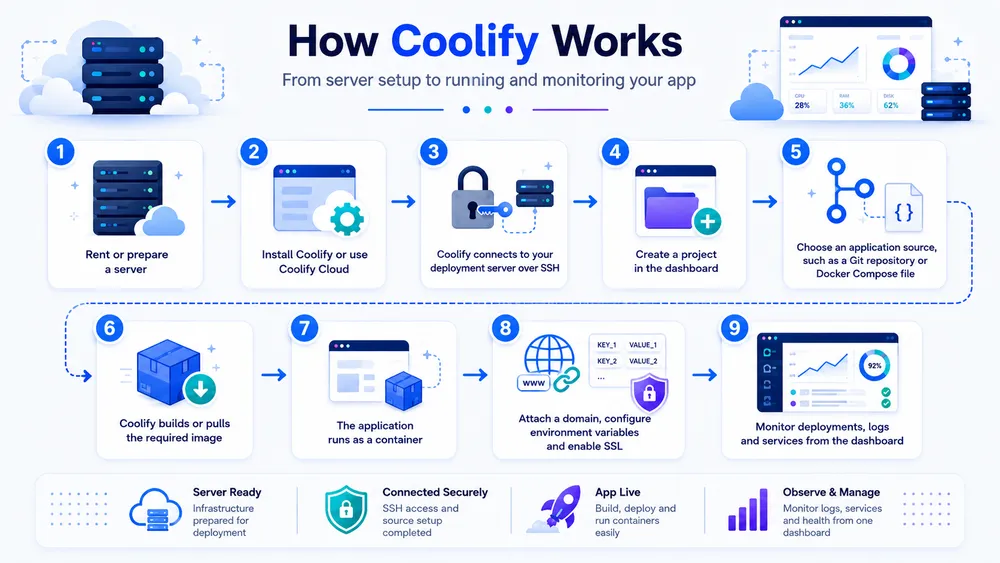
This is not the same as pushing code to Vercel and forgetting about infrastructure. Coolify gives you the deployment layer, but your own server is still doing the work. If the server runs out of memory, disk or CPU, Coolify cannot magically solve that. If you misconfigure backups, Coolify cannot recover data you never backed up. If your DNS or firewall is wrong, the application may still be unreachable.
This is why Coolify is best understood as “self-hosting with a better interface,” not as a complete replacement for every managed cloud feature.
How does Coolify deploy applications?
Coolify can deploy applications from different sources depending on how your project is built. For many developers, the simplest workflow is to connect a Git provider, select a repository and let Coolify build and deploy the app. For more advanced setups, you can use Dockerfiles or Docker Compose.
Coolify’s Dockerfile documentation explains that it can build Docker images from a custom Dockerfile and supports Git repositories, environment variables and pre- or post-deployment commands. This is useful when you want more control over the build process than a generic buildpack gives you.
For projects with multiple services, Docker Compose can be a better fit. For example, a single application might include a web server, a worker, Redis and a database. Docker Compose lets you define those pieces in one file. Coolify can work with that model, but it expects you to understand the Compose file and its implications.
Does Coolify use Docker?
Yes, Coolify is heavily tied to Docker-based deployment workflows. This is one of the reasons it appeals to modern web developers. Docker gives applications a portable runtime environment, and Coolify adds a dashboard and deployment workflow on top of that.
This Docker-first approach has clear benefits. It makes deployments more consistent, helps isolate services, and makes it easier to move projects between servers or providers. But it also means you should understand at least the basics of containers, images, ports, volumes and environment variables before relying on Coolify for important production workloads.
If you already use Docker locally, Coolify will feel more natural. If you have never touched Docker, you can still use Coolify, but you should expect to learn the fundamentals while setting up your first applications.
Does Coolify support Docker Compose?
Yes, Coolify supports Docker Compose, and this is one of its most important features for advanced users. Docker Compose is useful when your application depends on several containers that need to run together.
Coolify’s Docker Compose documentation says that when you use Docker Compose deployments, the docker-compose.yml or docker-compose.yaml file is the single source of truth. That means settings you might normally configure in the Coolify UI, such as environment variables or storage, need to be defined in the Compose file itself.
This is powerful, but it also changes the level of responsibility. A simple app deployment can be managed mostly through the UI. A Docker Compose deployment requires you to write and maintain a correct Compose file. If the file is wrong, Coolify will not magically infer the right architecture.
For developers comfortable with Docker Compose, this is a strength. For beginners, it can be a source of confusion. The safest approach is to start with a simple Git-based deployment or a basic Dockerfile app, then move to Docker Compose once you need multiple tightly connected services.
How Much Does Coolify Cost?

Coolify has two cost models: self-hosted and Cloud. The self-hosted version is free as software, but you pay for your own infrastructure. Coolify Cloud is a paid service where Coolify runs the dashboard on managed infrastructure while you still bring your own servers for deployments.
According to the official pricing page, Coolify Cloud costs $5 per month as a base price for connecting two servers, plus $3 per month for each additional server. The page also states that annual billing saves 20%.
The important detail is that Coolify Cloud does not mean Coolify hosts your apps for you in the same way Vercel or Render would. The pricing page says you need to bring your own servers. Coolify runs on managed infrastructure, but your applications still run on the servers you connect.
That distinction matters because it affects the real cost. If you self-host Coolify completely, you need a server for Coolify itself and server resources for your applications. If you use Coolify Cloud, you pay Coolify for the managed dashboard and still pay a VPS or cloud provider for the deployment servers.
Is Coolify self-hosted free?
Yes, Coolify self-hosted is free as software, but it is not free to operate unless you already have suitable infrastructure. You still need a server, storage, bandwidth, backups, monitoring and time.
A small VPS may be enough for experiments, internal tools or lightweight applications. But production workloads need more careful sizing. If you run Coolify, your app, your database and your builds on the same small VPS, you may hit resource limits quickly. Builds can use CPU and memory. Databases need stable storage and memory. Logs and backups consume disk space.
So the real question is not “Is Coolify free?” The better question is: what does it cost to run Coolify safely for your workload?
For a hobby project, the answer may be very little. For a client project or SaaS product, you should budget for a reliable VPS, backups, monitoring and possibly a separate database or storage provider.
How much does Coolify Cloud cost?
Coolify Cloud starts at $5 per month for the base plan that connects two servers, plus $3 per month per additional server. The official pricing page says this includes unlimited deployments per server, free email alerts for Coolify events, community plus limited email support, and founder-tested updates.
Coolify Cloud is attractive if you like Coolify’s deployment model but do not want to maintain the Coolify instance itself. In that setup, Coolify manages the dashboard infrastructure, while you connect your own servers for apps and services.
This model can make sense if you want fewer moving parts. Instead of running the Coolify control plane on your own server, you let Coolify handle it. You still need to maintain your deployment servers, but one part of the stack becomes managed.
What are Coolify’s hidden costs?
Coolify’s hidden costs are not deceptive fees. They are the normal operational costs of self-hosting.
You may need to pay for:
- A VPS or dedicated server.
- A separate database server for production workloads.
- Object storage for uploads and backups.
- Monitoring and alerting.
- Email delivery.
- Log management.
- Domain names and DNS services.
- Backup storage.
- Security hardening and maintenance time.
- Occasional migration or debugging work.
This is where some users misunderstand self-hosting. Coolify can reduce platform fees, but it does not eliminate infrastructure costs. It also shifts responsibility from the platform vendor to you. That can be a great trade if you are technical and want control. It can be a bad trade if your priority is to spend as little time as possible on operations.
A fair comparison should look at total cost of ownership, not just the monthly platform fee. A managed PaaS may look more expensive on paper, but it includes infrastructure abstraction, support, scaling features and operational convenience. Coolify may look cheaper, but your time and responsibility matter too.
What Are Coolify’s Main Features?
Coolify’s main features are application deployments, database deployments, one-click services, Git integrations, Docker support, Docker Compose support, domains, SSL, backups, notifications, API access and multi-server management. The combination makes it attractive for developers who want a broad self-hosted platform rather than a narrow deployment script.
The most important feature is the dashboard. A good dashboard matters because self-hosting often becomes messy when you manage multiple apps, domains, services and credentials across servers. Coolify centralizes much of that complexity.
The second important feature is deployment flexibility. Some platforms force you into a very specific workflow. Coolify supports several deployment patterns, including buildpacks, Dockerfiles and Docker Compose. That means it can handle simple projects and more customized stacks.
The third important feature is service management. Coolify is not limited to app deployment. It can also help you run databases and one-click services, which makes it useful for internal tools, automation stacks and small SaaS environments.
Application deployments
Coolify can deploy web applications using several approaches. For simple apps, you can connect a Git repository and let Coolify detect and build the application. For custom applications, you can use a Dockerfile. For more complex stacks, you can use Docker Compose.
This flexibility matters because modern web applications are not all built the same way. A static site, a Node.js API, a Laravel app, a Python backend and a multi-container SaaS stack may all need different deployment methods. Coolify does not solve every edge case, but it gives developers several paths instead of one rigid workflow.
Database deployments
Coolify can deploy and manage databases, including popular options such as PostgreSQL, MySQL, MariaDB, MongoDB and Redis-family tools. This is useful for developers who want to keep app and database management inside one dashboard.
However, production databases deserve special caution. Running a database on the same small VPS as your app may be fine for testing or low-traffic projects, but it can become risky as usage grows. Databases need reliable backups, stable disks, enough memory and careful monitoring.
For important production systems, you should decide whether a self-hosted database is worth the responsibility. In some cases, using Coolify for the app and a managed database from a cloud provider may be the safer architecture.
One-click services
One-click services are one of Coolify’s most attractive features. They let you deploy common tools faster without manually writing every configuration from scratch. Coolify’s website promotes more than 280 one-click services, which is one of its strongest selling points for developers who run many small tools.
This can be useful for deploying automation tools, dashboards, analytics platforms, CMS tools, databases, internal utilities and other self-hosted software. For agencies and indie hackers, one-click services can save time and make experimentation easier.
But one-click does not mean maintenance-free. After deployment, you still need to secure the service, configure authentication, update it, back it up and monitor it. One-click installation is the beginning of ownership, not the end.
Git integrations
Coolify supports Git-based workflows, which makes it feel familiar to developers coming from Heroku, Vercel, Netlify, Railway or Render. Instead of uploading files manually, you can connect a repository and deploy from code changes.
This is one reason Coolify works well for developers building actively maintained applications. Git-based deployment keeps the application lifecycle closer to the development workflow. You update code, push changes and redeploy from a structured source rather than manually editing production files.
SSL, domains and reverse proxy
Coolify also helps with domains, routing and SSL. These features are critical because deploying an application is not just about running a container. Users need to reach it through a domain, and modern websites need HTTPS.
Tools like Coolify are valuable because they reduce the number of manual configuration steps needed to expose applications safely. Without a platform layer, developers often need to configure reverse proxies, certificates, ports and redirects themselves.
That said, you still need to understand the basics of DNS, domains and firewall rules. If your domain records are wrong or the server ports are blocked, the dashboard alone cannot fix the problem.
Notifications, API and backups
Coolify also includes features around notifications, API access and backups. These features matter when you move beyond hobby projects. A production deployment platform should not only launch applications; it should help you understand what is happening when deployments fail, services restart or resources run low.
Backups deserve special attention. A platform can provide backup features, but the responsibility is still yours. You need to decide what gets backed up, where backups are stored, how often they run and whether you have tested restores. A backup that has never been restored is only a hope, not a recovery plan.
What Server Do You Need to Run Coolify?
Coolify needs a Linux server with SSH access, enough CPU and memory for the dashboard, and enough spare resources for the applications you want to deploy. The official installation documentation lists a minimum of 2 CPU cores, 2 GB of RAM and 30 GB of free storage, but that should be treated as a starting point rather than a comfortable production setup. Coolify’s docs also warn that running both builds and Coolify on the same server can create high resource usage and make the server unresponsive if you do not monitor it carefully.
For a small test project, a 2 GB RAM VPS may be enough. For real production use, especially if you plan to run apps, databases and background workers on the same machine, you should usually start higher. A more practical baseline for a small production server is often 4 GB to 8 GB RAM, 2 to 4 vCPUs, SSD storage and a separate backup strategy.
Coolify can work with several types of infrastructure. You can use a VPS, a dedicated server, a virtual machine, a Raspberry Pi or another server with SSH access. The official docs say Coolify supports Debian-based distributions, Red Hat-based distributions, SUSE-based distributions, Arch Linux, Alpine Linux and 64-bit Raspberry Pi OS, with AMD64 and ARM64 architectures supported.
For most users, the safest choice is a fresh Ubuntu LTS VPS. Coolify’s automatic installation script works with Ubuntu LTS versions such as 20.04, 22.04 and 24.04, while non-LTS Ubuntu versions require manual installation.
A simple way to think about sizing is this:
| Use case | Suggested starting point | Notes |
|---|---|---|
| Testing Coolify | 2 vCPU, 2 GB RAM, 30 GB storage | Good for learning, not ideal for production |
| Small apps or internal tools | 2 to 4 vCPU, 4 GB RAM, 50+ GB storage | Better headroom for builds and services |
| Several client projects | 4 vCPU, 8 GB RAM, 100+ GB storage | Consider separating databases |
| Production SaaS | Depends on workload | Use monitoring, backups, alerts and possibly managed databases |
| Database-heavy workloads | Higher RAM and reliable storage | Avoid underpowered shared VPS plans |
The server choice matters because Coolify is not the host itself. Your VPS is still the machine doing the work. If your application is slow, your database is overloaded, or your disk fills up, Coolify may show you the problem, but it cannot change the physical limits of the server.
If you use multiple servers, you also need to understand how traffic flows. Coolify’s server documentation explains that each connected server runs its own proxy for applications deployed on that server. Traffic for apps on secondary servers goes directly to those servers, not through the main Coolify server. That means your DNS records must point to the server where the application is actually deployed.
This is a key point for production architecture. The main Coolify instance gives you the management UI and coordinates deployments, but it should not be misunderstood as a central traffic router for every app in a multi-server setup. If you deploy an app on Server B, the domain needs to resolve to Server B.
How Do You Install Coolify on a VPS?
The fastest way to install Coolify is to use the official installation script on a fresh supported Linux server. Coolify’s documentation recommends the quick installation method because it automates the setup and reduces manual errors. The official command is:
curl -fsSL https://cdn.coollabs.io/coolify/install.sh | sudo bash
The documentation also shows a version without sudo when you are logged in as root. After installation, the script displays the Coolify URL, and you visit that URL to create the first admin account. The docs warn that you should create the admin account immediately, because if someone else reaches the registration page first, they could gain control of the server.
A safe installation workflow looks like this:
- Create a fresh VPS with Ubuntu LTS.
- Point a domain or subdomain to the server if you want a clean dashboard URL.
- Update the server packages.
- Configure SSH access securely.
- Check firewall rules.
- Run the official Coolify installation script.
- Create the admin account immediately.
- Configure the server, domain, proxy and email alerts.
- Deploy a small test app before moving anything important.
- Configure backups and monitoring before using Coolify for production.
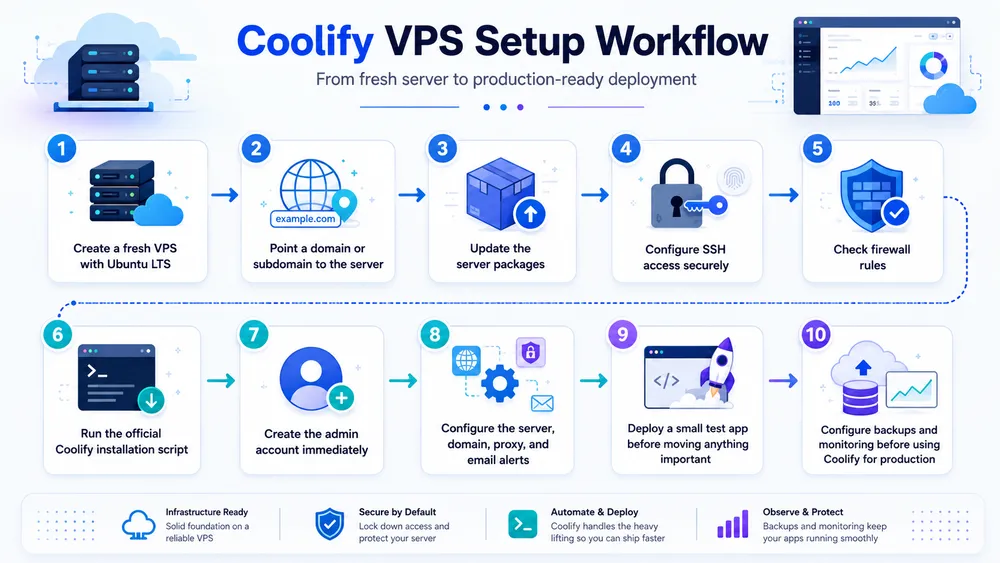
The fresh-server recommendation is important. If your VPS already has old Docker containers, custom nginx configurations, conflicting ports or legacy services, installation and routing can become harder to debug. For a first Coolify setup, start clean.
Coolify also requires SSH connectivity between Coolify and the server it manages, with SSH key authentication. Its server documentation lists Docker Engine 24+ as a requirement for connected servers.
If the automatic installer fails, the next step is not to run random commands from forums. Check the official manual installation docs and verify that your server uses a supported operating system, has Docker installed correctly, and exposes the required ports. Installation issues are usually easier to fix before you add real applications.
For production, do not stop after the first successful login. A working dashboard is only the beginning. You still need to harden SSH, review firewall rules, configure DNS correctly, set up backups, test restores, enable alerts, and decide how updates will be handled.
How Do You Deploy an App with Coolify?
To deploy an app with Coolify, you create a project, choose an application source, connect it to a server, configure build settings, add environment variables, assign a domain and start the deployment. The exact steps depend on whether your application comes from a Git repository, a Dockerfile, a Docker image or a Docker Compose file.
A basic deployment flow looks like this:
- Connect your Git provider or repository.
- Create a new project in Coolify.
- Add a new application.
- Choose the source repository or deployment method.
- Select the branch to deploy.
- Configure build settings if needed.
- Add environment variables.
- Attach a domain.
- Deploy.
- Check logs and confirm the app is reachable.
Please, let us see how is the workflow with in this capture :
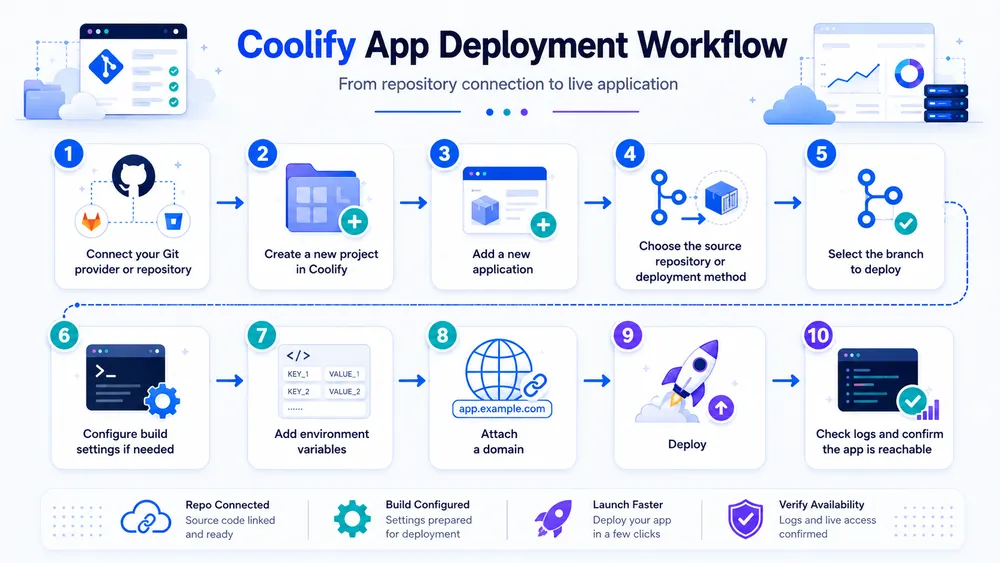
For many web apps, this workflow is enough. A Node.js app, Laravel app, Django app, Rails app or static site may be deployable with relatively little custom configuration if the project structure is clean.
The complexity increases when your app needs multiple services. For example, a production SaaS might need a web app, background worker, queue, Redis instance, PostgreSQL database and object storage. At that point, you need to decide whether to deploy everything through Coolify, use Docker Compose, or mix Coolify with external managed services.
Coolify’s Docker Compose support is useful here, but it requires discipline. The official Docker Compose documentation says the Compose file is the single source of truth, meaning settings like environment variables and storage need to be defined inside the Compose file rather than only in the UI.
That design gives advanced users more control, but it can surprise beginners. If you are used to configuring everything through a dashboard, Docker Compose may feel less intuitive. If you already manage Compose files locally, Coolify’s approach will probably feel natural.
For a first deployment, do not start with your most important production application. Start with a simple app. Confirm that builds work, logs are readable, SSL is configured, domains resolve correctly, and redeployments behave as expected. Then move to more complex workloads.
A good Coolify production deployment checklist should include:
| Area | What to verify |
|---|---|
| DNS | Domain points to the correct server IP |
| SSL | HTTPS works and renews correctly |
| Environment variables | Secrets are configured safely |
| Logs | Deployment and runtime logs are readable |
| Backups | Database and volumes are backed up |
| Restore test | A backup can actually be restored |
| Monitoring | CPU, RAM, disk and uptime are tracked |
| Updates | Coolify and app update strategy is defined |
| Security | SSH, firewall and admin access are restricted |
| Scaling | You know what happens when traffic grows |
This checklist is where Coolify users separate hobby deployments from serious deployments. The platform helps you deploy, but production readiness still depends on the operational choices around it.
What Are the Pros and Cons of Coolify?
Coolify’s biggest advantage is that it gives developers a modern self-hosted deployment workflow without requiring them to assemble every part of the stack manually. Its biggest drawback is that self-hosting remains self-hosting: you own the server, the risk and the maintenance.
Here is the practical breakdown.
| Pros | Cons |
|---|---|
| Open-source and self-hostable | You manage your own infrastructure |
| Free self-hosted software | Server costs still apply |
| Modern dashboard | Not as hands-off as managed PaaS |
| Git-based deployments | Requires technical knowledge |
| Docker and Docker Compose support | Compose can be confusing for beginners |
| One-click services | One-click does not mean maintenance-free |
| Database deployments | Production databases need serious backups |
| Multi-server support | DNS and routing must be understood |
| Coolify Cloud option | Apps still run on your own servers |
| Good fit for indie hackers and agencies | Not ideal for non-technical teams |
The main reason to use Coolify is control. You control the server, the provider, the application stack and the deployment environment. You can run multiple small projects on your own infrastructure instead of creating a separate managed deployment setup for each one.
The second reason is cost predictability. If your workloads fit comfortably on a VPS, Coolify can be cheaper than managed platforms that charge per app, seat, build minute or usage tier. That does not mean Coolify is always cheaper. It means the cost structure is different. You pay more in infrastructure responsibility and less in platform abstraction.
The third reason is flexibility. Coolify supports several deployment methods, which makes it more adaptable than platforms that only work well for one framework or one hosting model. This matters if you manage mixed projects: a Next.js app, a Laravel API, a static site, a PostgreSQL database and a few internal tools.
The disadvantages come from the same source as the advantages. Because you control the infrastructure, you are responsible for it. You need to know how to secure a server, read logs, handle disk space, configure backups and recover from failure. Coolify can make those tasks easier to manage, but it cannot make them disappear.
The biggest mistake is to treat Coolify like a fully managed PaaS. It is not. It is closer to a self-hosted deployment platform with a polished interface. That distinction matters when real users, real payments or client projects depend on your infrastructure.
Coolify vs Dokploy: Which Self-Hosted PaaS Is Better?
Coolify and Dokploy are two of the most important self-hosted PaaS options for developers who want to run applications on their own VPS or hardware. Coolify currently has stronger brand recognition and a broad open-source ecosystem.
Dokploy positions itself as a more polished open deployment solution with automation, monitoring, integration features and team-oriented workflows. Dokploy’s own comparison page says both tools are leading options for self-hosted deployments, but its recommendation naturally favors Dokploy, so it should be read as a competitor’s perspective rather than a neutral source.
The best choice depends on what you value most.
Choose Coolify if you want:
- A popular open-source self-hosted PaaS.
- A broad set of one-click services.
- A mature community footprint.
- A Heroku/Vercel-like self-hosted experience.
- Flexibility for apps, databases and services.
- A Cloud option that manages the Coolify dashboard while you bring your servers.
- Choose Dokploy if you want:
- A newer alternative with strong emphasis on polish.
- Docker, Compose, Nixpacks and Buildpacks support.
- Team and organization workflows.
- Monitoring and automation as key selling points.
- A product that markets itself more directly to teams and businesses.
This table helps you understand the difference between coolify and Dokploy :
| Criterion | Coolify | Dokploy |
|---|---|---|
| Best for | Indie hackers, developers, agencies, self-hosters | Developers and teams wanting a polished deployment product |
| Positioning | Open-source self-hosted PaaS alternative to Heroku/Vercel-style tools | Open deployment platform with automation and team-focused features |
| Learning curve | Moderate | Moderate |
| Ecosystem visibility | Strong | Growing |
| UI polish | Good, but can feel less polished depending on user expectations | Strong part of Dokploy’s positioning |
| Docker Compose | Supported | Supported |
| One-click services | Strong Coolify selling point | Available, but compare current catalog before choosing |
| Best decision factor | Ecosystem and feature breadth | Product polish and team workflow |
For many solo developers, Coolify will be the safer first choice because it is widely discussed and has strong visibility. For teams evaluating a more polished operational workflow, Dokploy deserves serious testing. The smartest recommendation is to try both with the same small app and database, then compare setup time, logs, rollback experience, resource usage, backup flow and UI clarity.
Choose based on what happens when a deployment fails, a database needs restoring, a domain is misconfigured, or a server runs low on memory. That is where deployment platforms prove their real value. To learn more about Dokploy, read our complete review about Dokploy here.
Coolify vs CapRover: Which One Should You Choose?
Coolify is usually the better choice if you want a newer self-hosted PaaS experience with a modern dashboard, broad one-click service positioning and stronger momentum among developers looking for a Heroku, Vercel or Railway alternative.
CapRover is still a solid option if you want a mature app and database deployment manager built around Docker, nginx, Let’s Encrypt and NetData. The official CapRover website describes it as an app/database deployment and web server manager for Node.js, Python, PHP, Ruby, MySQL, MongoDB, Postgres, WordPress and other applications.
CapRover’s strengths are maturity and simplicity. It has been around for years, and many developers like it because it does the core job without trying to become everything. It gives you a GUI, CLI, Docker-based deployments and HTTPS support.
Coolify’s strengths are broader modern deployment expectations. It feels closer to what many developers now expect from platforms like Railway, Render or Vercel, while still being self-hosted. It also has stronger current visibility in self-hosting discussions.
A fair comparison looks like this:
| Criterion | Coolify | CapRover |
|---|---|---|
| Best for | Modern self-hosted PaaS workflows | Simple app/database deployment management |
| Underlying approach | Docker-based deployment platform | Docker, nginx, Let’s Encrypt, NetData |
| UI | Modern and feature-rich | Simpler and more traditional |
| Ecosystem | Strong current momentum | Mature, established community |
| Learning curve | Moderate | Moderate |
| Best use case | Multiple apps, services, databases, developer projects | Straightforward web app and database hosting |
Choose Coolify if you want the more modern platform experience. Choose CapRover if you want a simpler, older and battle-tested self-hosted deployment manager that does not need to match the latest PaaS trends.
Coolify vs Dokku: Which Heroku Alternative Is Better?
Coolify and Dokku solve a similar problem in very different ways. Dokku is a lightweight, CLI-first open-source PaaS alternative to Heroku. The official Dokku website describes it as an open-source PaaS alternative to Heroku that helps users build and manage the lifecycle of applications from building to scaling.
The key difference is interface and philosophy. Dokku feels like a developer tool for people who enjoy command-line workflows. Coolify feels like a platform for people who want a visual dashboard.
Choose Dokku if you want:
- A small, focused Heroku-like workflow.
- Git push deployments.
- A CLI-first experience.
- Fewer moving parts.
- Strong control through commands and plugins.
- Choose Coolify if you want:
- A web dashboard.
- App, database and service management in one place.
- Easier visibility for multiple projects.
- One-click services.
- A more accessible experience for teams or agencies that do not want everything in the terminal.
Dokku may be better for minimalists. Coolify may be better for developers who want visibility and convenience. If you are comfortable with CLI tools and only need to deploy a few applications, Dokku remains a strong choice. If you want to manage many apps, services and databases visually, Coolify is probably easier to work with day to day.
Is Coolify a Good Alternative to Heroku, Vercel, Railway and Render?
Coolify can be a good alternative to Heroku, Vercel, Railway and Render if you want more infrastructure control and are willing to manage your own servers. It is not a perfect replacement for those platforms because the operational model is different.
Managed platforms are built around convenience. You deploy your app, and the platform abstracts much of the infrastructure. You may pay more, but you also get a smoother operational experience, integrated scaling features, managed runtime assumptions, support systems and less direct server maintenance.
Coolify is built around control. You bring the server, and Coolify helps you deploy to it. That gives you flexibility and potential cost savings, but it also means you need to manage infrastructure decisions yourself.
A simple decision table helps:
| Choose Coolify if… | Choose a managed platform if… |
|---|---|
| You want to own your infrastructure | You want less operational work |
| You understand VPS hosting | You do not want to manage servers |
| You want predictable server-based costs | You prefer platform-managed scaling |
| You run multiple small apps | You need enterprise support or compliance |
| You are comfortable with Docker | You want framework-specific optimization |
| You can handle backups and monitoring | You want the vendor to handle more of the stack |
Coolify is not better than Heroku or Vercel in every situation. It is better for a specific kind of user: someone who values control more than convenience and is technical enough to accept the trade-off.
For indie hackers and agencies, that trade-off can be excellent. For non-technical founders or enterprise teams with strict operational requirements, a managed platform may still be the smarter choice.
Who Is Coolify Best For?

Coolify is best for technical users who want control over their infrastructure but do not want to manage every deployment step manually. The ideal Coolify user is comfortable with servers, SSH, domains, DNS, Docker basics and production responsibility, but wants a cleaner interface for deploying and managing applications.
Coolify is especially useful for indie hackers. If you are building small SaaS products, MVPs, side projects or internal tools, Coolify can help you run several projects on one or more VPS servers without creating a separate managed hosting setup for every idea. You still need to manage the server, but the deployment workflow becomes much easier than configuring everything manually.
It is also a strong fit for agencies. Many small agencies manage websites, dashboards, APIs, WordPress projects, automation tools and client portals. Coolify can centralize those deployments and make it easier to organize apps, databases and services across servers. The value is not only cost. It is operational visibility.
Technical founders can also benefit from Coolify, especially in the early stages of a product. When a startup is still validating an idea, the ability to deploy quickly on a VPS can be attractive. You can avoid some managed-platform costs and keep more control over the stack. But once the product becomes mission-critical, the founder must decide whether the team has enough operational maturity to keep self-hosting safely.
Coolify also works well for developers who run internal tools. Many companies and creators need small private apps: dashboards, admin panels, automations, analytics tools, CRMs, data tools, bots or background workers. These projects may not justify a full managed platform setup, but they still need a clean deployment process.
A good Coolify user usually matches this profile:
- They know how to connect to a VPS with SSH.
- They understand basic DNS and domain setup.
- They know what Docker is, even if they are not Docker experts.
- They can read application logs.
- They understand the importance of backups.
- They are willing to monitor CPU, RAM, disk usage and uptime.
- They want control over cost and infrastructure.
- They are comfortable troubleshooting.
Coolify is not only for advanced DevOps engineers. That is part of its appeal. It lowers the barrier to self-hosted deployments. But it is still a technical product. The more you understand about servers and containers, the more value you will get from it.
For this reason, Coolify is best described as a developer-friendly self-hosted PaaS, not a beginner hosting platform. A beginner can learn with it, but a production user should understand what is happening below the dashboard.
Who Should Not Use Coolify?
You should not use Coolify if you want a fully managed hosting platform where the vendor handles most infrastructure responsibility for you. Coolify makes self-hosting easier, but it does not remove the need to manage servers, backups, monitoring, security and production incidents.
Non-technical users should be careful. If you do not know what SSH, DNS, Docker, environment variables or server logs are, Coolify may feel easier than manual DevOps, but it will still be confusing when something breaks. A managed platform, a traditional web host or a developer-supported setup may be safer.
Coolify is also not ideal for teams that need enterprise-grade compliance, guaranteed support, strict SLAs, managed scaling, audit workflows or vendor-backed incident response. The official Coolify Cloud pricing page mentions community plus limited email support, but that is not the same as enterprise operational coverage. It also says users must bring their own servers, which means your apps still depend on infrastructure you manage.
You should be cautious with Coolify if your application has heavy production requirements. For example, a payment-heavy SaaS product, a healthcare application, a finance platform, a high-traffic marketplace or a critical client system needs serious infrastructure planning. Coolify may still be part of the stack, but it should not be chosen only because it is cheaper or more flexible.
- Avoid Coolify if these statements describe your situation:
- You do not want to manage a server.
- You do not want to think about backups.
- You need a vendor to handle production incidents.
- You need compliance and audit support.
- You need built-in autoscaling with minimal configuration.
- You do not have anyone technical on the team.
- You are not comfortable debugging Docker or DNS issues.
- You want hosting that “just works” without infrastructure decisions.
The most dangerous mistake is choosing Coolify for the wrong reason. If your only motivation is saving money, you may underestimate the value of managed infrastructure. If your motivation is control, learning, flexibility and lower platform fees, Coolify makes much more sense.
Coolify is a strong tool, but it rewards users who accept responsibility. It is not a shortcut around DevOps. It is a friendlier way to manage part of your DevOps workflow.
What Are the Best Coolify Alternatives?

The best Coolify alternatives are Dokploy, CapRover, Dokku, Kamal, Render, Railway, Fly.io, Heroku, Vercel and DigitalOcean App Platform. The right choice depends on whether you want a self-hosted platform, a command-line deployment tool or a fully managed cloud platform.
The closest alternatives to Coolify are Dokploy, CapRover and Dokku. These tools are in the same broad self-hosted PaaS category. They help developers deploy applications without relying completely on a managed PaaS provider.
Dokploy is probably the most direct modern alternative. Its official site describes it as an open-source, self-hostable Platform as a Service that simplifies deployment and management of applications and databases. It also highlights Traefik management and one-click templates. Dokploy is worth considering if you want a polished self-hosted deployment platform and you are already comparing it against Coolify.
CapRover is another strong alternative. Its official site describes it as an app and database deployment manager for Node.js, Python, PHP, ASP.NET, Ruby, MySQL, MongoDB, PostgreSQL, WordPress and more. CapRover uses Docker, nginx, Let’s Encrypt and NetData under the hood. It is mature, practical and still useful for developers who want a simpler self-hosted PaaS.
Dokku is the minimalist option. The official Dokku site calls it an open-source PaaS alternative to Heroku and says it helps users manage the application lifecycle from building to scaling. Dokku is best if you like a CLI-first workflow and do not need a large visual dashboard.
Kamal is different. It is not a dashboard-based PaaS like Coolify. Kamal is a deployment tool for containerized web apps from bare metal to cloud VMs. Its official site highlights zero-downtime deploys, rolling restarts, asset bridging, remote builds and accessory service management. It is a good alternative if you want a powerful deployment workflow without adopting a full self-hosted PaaS interface.
Managed platforms are alternatives too, but they solve the problem differently. Render, Railway, Heroku, Vercel and Fly.io reduce the amount of server work you need to do. They usually cost more in platform fees, but they can save time and reduce operational risk. For many teams, that trade-off is worth it.
Here is the practical comparison:
| Alternative | Best for | Self-hosted? | Main difference from Coolify |
|---|---|---|---|
| Dokploy | Developers and teams wanting a polished self-hosted PaaS | Yes | Closest modern competitor |
| CapRover | Simple self-hosted app and database deployments | Yes | Older, mature and straightforward |
| Dokku | CLI-first Heroku-like deployments | Yes | Minimal dashboard, command-line focused |
| Kamal | Docker deployments from bare metal to cloud VMs | Yes, but not a PaaS dashboard | Deployment tool rather than platform UI |
| Render | Managed app hosting | No | Less server management |
| Railway | Managed developer-friendly deployments | No | Fast developer workflow, managed infrastructure |
| Fly.io | Global app deployments | No | Managed infrastructure with edge/global focus |
| Heroku | Classic managed PaaS | No | Most familiar PaaS model |
| Vercel | Frontend and full-stack web apps | No | Strongest for Next.js-style workflows |
| DigitalOcean App Platform | Managed app hosting on DigitalOcean | No | Managed option from VPS/cloud provider |
Choose Coolify, Dokploy, CapRover or Dokku if you want to self-host. Choose Render, Railway, Heroku, Vercel or Fly.io if you want the platform to manage more of the operational burden. Choose Kamal if you want deployment automation without adopting a full dashboard-driven PaaS.
Should You Use Coolify in 2026?
You should use Coolify in 2026 if you want an open-source, self-hosted PaaS that lets you deploy applications, databases and services on your own servers with a modern developer experience. It is one of the strongest options for technical users who want the convenience of a PaaS without giving up infrastructure control.
The official Coolify GitHub repository describes the project as an open-source, self-hostable alternative to Heroku, Netlify and Vercel that helps users manage servers, applications and databases on their own hardware through an SSH connection. That is the clearest summary of its value proposition: Coolify gives you cloud-like convenience on your own servers.
The strongest reasons to use Coolify are control, flexibility and cost structure. You can bring your own VPS, deploy multiple projects, run databases, add services and avoid being locked into a single managed hosting provider. If you already understand Docker and VPS hosting, Coolify can make your workflow much more efficient.
The strongest reasons not to use Coolify are responsibility, maintenance and risk. You need to manage the server. You need backups. You need monitoring. You need to understand what happens when a deployment fails or when disk space runs out. If you are not ready for that, a managed platform is safer.
The final verdict is simple:
- Coolify is excellent for technical users who want self-hosted control.
- Coolify is risky for non-technical users who expect managed hosting.
- Coolify can save money, but only if you value your own maintenance time correctly.
- Coolify is a strong Heroku, Vercel, Netlify, Railway or Render alternative for the right user, but not a universal replacement.
For most indie hackers, agencies and technical founders, Coolify deserves to be on the shortlist. It is not perfect, but it hits a real need: modern deployment without surrendering your infrastructure.
Coolify vs Dokploy deserves special attention. If you are choosing between them, test both with the same project. Deploy the same app, connect the same domain, add the same database, review the logs, test a failed deployment, check backups and measure how comfortable you feel using each interface. The winner is the one you can operate safely, not the one with the better landing page.
FAQ
Is Coolify free?
Yes, Coolify is free if you self-host it, but you still need to pay for your own server, storage, bandwidth, backups and monitoring. Coolify Cloud is paid. The official pricing page lists Coolify Cloud at $5 per month as a base price for connecting two servers, plus $3 per month per additional server.
Is Coolify open source?
Yes, Coolify is open source. Its GitHub repository describes it as an open-source and self-hostable alternative to Heroku, Netlify and Vercel. The repository also explains that Coolify helps users manage servers, applications and databases on their own hardware through SSH access.
What is Coolify used for?
Coolify is used to deploy and manage applications, databases and services on your own servers. Developers use it for web apps, APIs, SaaS products, internal tools, databases, one-click services and self-hosted software. It is especially useful when you want a PaaS-style workflow on VPS infrastructure you control.
What does Coolify do?
Coolify connects to your servers and helps you deploy apps, run databases, manage services, configure domains, enable HTTPS, handle Docker-based workloads and organize projects from a dashboard. Its official website describes it as a platform for deploying apps, databases and more than 280 services to your own server.
How does Coolify work?
Coolify works by connecting to your server, usually over SSH, and managing applications and services on that server. It relies heavily on container-based deployment workflows and gives you a web interface for managing projects, environment variables, builds, domains, logs and services.
Is Coolify good?
Coolify is good for developers who want self-hosted control with a simpler deployment workflow. It is not good for users who want fully managed hosting with minimal infrastructure responsibility. The best users are technical founders, indie hackers, agencies and developers comfortable with VPS hosting, Docker and server maintenance.
Is Coolify production-ready?
Coolify can be used for production, but production readiness depends on your architecture and operations. The Coolify team noted in the v4.0 release that many companies and individuals had already been using Coolify in production for one to two years before that release. Still, you need proper backups, monitoring, server sizing, security and restore testing.
How much does Coolify cost?
Self-hosted Coolify is free as software, but you pay for your server and related infrastructure. Coolify Cloud costs $5 per month as a base price for connecting two servers, plus $3 per month per additional server, according to the official pricing page. Annual billing is advertised with a 20% saving.
What server do I need for Coolify?
Coolify’s official installation docs list minimum hardware requirements of 2 CPU cores, 2 GB RAM and 30 GB of free storage. The docs also recommend slightly higher resources for smoother operation and warn that builds can create high resource usage if you run everything on the same server.
Can Coolify deploy databases?
Yes, Coolify can deploy databases. It is designed to help manage applications, servers and databases, and its documentation includes database-related setup and management workflows. For production databases, you should still plan backups, monitoring, storage reliability and restore tests carefully.
Does Coolify support Docker Compose?
Yes, Coolify supports Docker Compose. Its documentation says the docker-compose.yml or docker-compose.yaml file is the single source of truth for Docker Compose deployments, meaning settings such as environment variables and storage should be defined in the Compose file itself.
Can I deploy Next.js with Coolify?
Yes, Coolify can deploy Next.js applications if the project is configured correctly. Depending on the project, you may deploy it through a Git repository, a build pack, a Dockerfile or Docker Compose. As with any production Next.js deployment, you should test builds, environment variables, routing and server resources before relying on it.
Is Coolify better than Dokploy?
Coolify is better if you want a widely recognized self-hosted PaaS with strong community visibility and broad one-click service positioning. Dokploy may be better if you prefer its product polish, team features, templates and monitoring-focused positioning. Dokploy describes itself as an open-source self-hostable PaaS for deploying and managing apps and databases.
Is Coolify better than CapRover?
Coolify is usually better if you want a newer and more modern self-hosted PaaS experience. CapRover is better if you want a mature, straightforward app and database deployment manager using Docker, nginx, Let’s Encrypt and NetData. CapRover remains a serious option for simple self-hosted deployments.
Is Coolify better than Dokku?
Coolify is better if you want a visual dashboard for managing apps, services and databases. Dokku is better if you want a minimal CLI-first Heroku alternative. Dokku’s official site describes it as an open-source PaaS alternative to Heroku for managing the application lifecycle from build to scaling.
What are the best Coolify alternatives?
The best Coolify alternatives are Dokploy, CapRover, Dokku, Kamal, Render, Railway, Fly.io, Heroku, Vercel and DigitalOcean App Platform. Dokploy, CapRover and Dokku are closest if you want self-hosting. Render, Railway, Fly.io, Heroku and Vercel are better if you want managed infrastructure.
Is Coolify a good Heroku alternative?
Yes, Coolify is a good Heroku alternative for technical users who want to run applications on their own servers. It offers a PaaS-like workflow, but it does not provide the same managed operational model. Choose Coolify for control and self-hosting. Choose Heroku if you want more infrastructure abstraction.
Is Coolify a good Vercel alternative?
Coolify can be a good Vercel alternative if you want to self-host apps and control the server. It is not a direct replacement for Vercel’s frontend platform, edge features or managed developer experience. For Next.js projects, Coolify can work well, but Vercel may still be easier for teams that want framework-specific optimization.
Is Coolify safe?
Coolify can be safe if installed and managed correctly, but security depends on your server configuration, SSH setup, firewall rules, update process, backups, secrets management and access controls. Self-hosting always shifts more security responsibility to you. Do not expose admin panels carelessly, and create the first admin account immediately after installation.
Does Coolify need Docker?
Coolify is strongly built around Docker-based deployment workflows. It can deploy applications using Dockerfiles, Docker Compose and other build approaches. If you understand Docker basics, you will use Coolify more confidently. If you do not, you should learn containers, images, ports, volumes and environment variables before using it for production.
Should beginners use Coolify?
Beginners can use Coolify to learn self-hosting, but they should start with non-critical projects. Coolify makes deployments easier, but it does not remove the need to understand servers, DNS, Docker, logs, backups and security. For a business-critical project, beginners should get technical help or use a managed platform.
Coolify Review : final Verdict
Coolify is one of the strongest self-hosted PaaS options in 2026 for developers who want control, flexibility and a modern deployment workflow. It is not a fully managed platform, and that distinction is essential. Coolify helps you deploy and manage applications on your own infrastructure, but you still own the operational responsibility behind that infrastructure.
For indie hackers, agencies, technical founders and developers running several apps or internal tools, Coolify can be an excellent choice. It can reduce platform fees, centralize deployments and give you a more enjoyable self-hosting experience.
For non-technical users, enterprise teams with strict compliance requirements or anyone who wants hands-off infrastructure, Coolify may be the wrong choice. A managed platform like Heroku, Render, Railway, Vercel or Fly.io will usually be safer and easier.
The best way to decide is to test Coolify with a real but low-risk project. Deploy an app, add a database, connect a domain, configure SSL, trigger a failed deployment, check logs, create backups and test a restore. If that workflow feels manageable, Coolify may become a powerful part of your stack. If it feels stressful, choose a managed platform.
