
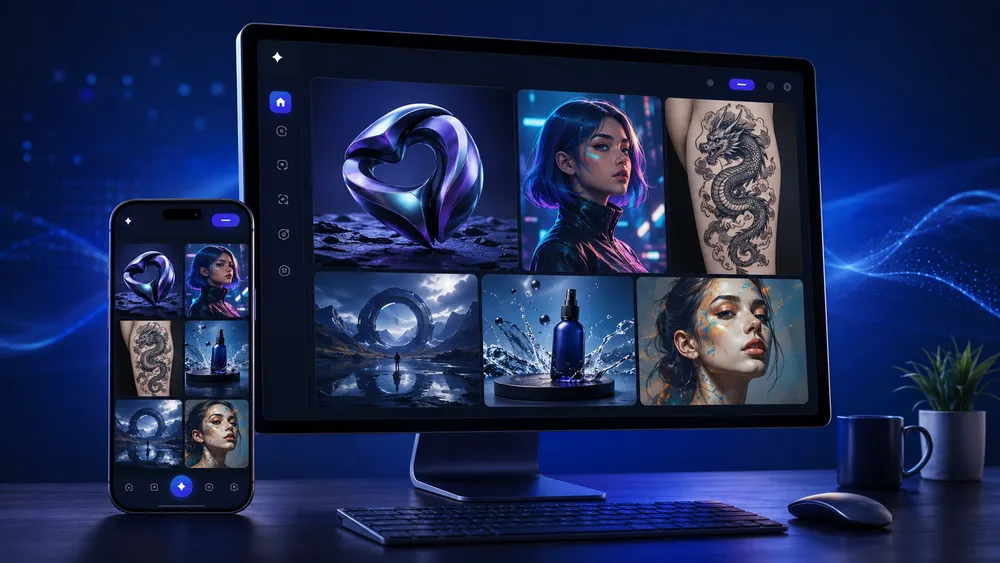
DaVinci AI Review 2026 : Pricing, Test, Limitations and Best Alternatives
DaVinci AI is one of the AI-powered visual generation platforms that has evolved the most over the past two years. With 100M+ claimed creators and access to models such as Sora, Veo, Kling, or Flux within a single subscription, its positioning is ambitious. But does the tool actually live up to that promise?
Its 3.3-star Android rating based on 186,000+ reviews raises a legitimate question that the 4.5/5 rating displayed on Trustpilot is not enough to dismiss.
Editorial transparency note: This article was written independently. Critiqueplus.com had no commercial partnership with DaVinci AI (davinci.ai) at the time of publication. The prices and features mentioned are based on the official website and verified third-party sources consulted in September 2026.
In short
| Criterion | Our assessment |
|---|---|
| Ease of use | ✅ Very accessible, mobile-first |
| Available models | ✅ 50+ models (Sora, Veo, Kling, Flux…) |
| Entry price | ⚠️ No permanent free plan displayed |
| Credit-to-price ratio | ⚠️ Varies depending on actual usage |
| User reviews | ⚠️ Highly mixed depending on the platform |
| Privacy | ⚠️ Points to review before professional use |
| Overall score | 6.5 / 10 |
What is DaVinci AI?
DaVinci AI is an all-in-one generative visual creation platform. It brings together, within a single workspace, some of the best AI models available for generating images, videos, and audio content from simple text prompts.
The official website (davinci.ai) describes the platform as: “All Your Visual Creation. One Platform.” The promise is straightforward: access Sora, Veo, Kling, Flux, Nano Banana, Seedance, and Seedream without switching between multiple tools or managing several subscriptions.
A model aggregator, not a proprietary AI model
This is the key point to understand. DaVinci AI is not an in-house AI model. It is a unified access layer that connects users to some of the most powerful models on the market. In practical terms:
- Sora (OpenAI) and Veo (Google) for high-end video generation
- Kling for realistic video and fluid motion
- Flux for high-fidelity image generation
- Nano Banana, Seedance, and Seedream for specific styles and faster rendering
This approach offers a major advantage: users can benefit from the latest AI advances without changing tools. It also has a limitation: DaVinci AI depends on the quality and availability of these third-party models.
100M+ users: how meaningful is this figure?
The website displays the claim “Trusted by 100M+ creators worldwide.” This figure likely combines cumulative downloads across iOS and Android since the application was launched by HubX. It has not been independently verified. By comparison, the Google Play listing displays 10M+ downloads. The 100M figure should therefore be viewed as an indicator of awareness rather than proof of user satisfaction.
Not to be confused with DaVinci Resolve
A common source of confusion: DaVinci Resolve is the professional video editing and color grading software developed by Blackmagic Design and used by thousands of studios worldwide. DaVinci AI (davinci.ai), on the other hand, is an AI media-generation application developed by HubX. The two products are not related.
What are the main features of DaVinci AI?
DaVinci AI positions itself as a complete creative studio. Its features fall into three main categories: generation, editing, and distribution.
Image, video, and voice generation
Image generation remains the core of the product. Users write a prompt, choose from more than 50 available models, and receive one or more visuals. Supported styles range from photorealism to stylized illustration, including concept art, minimalist logos, and geometric tattoo designs.
Video generation is the most significant development of 2025–2026. With access to Sora, Veo, and Kling, DaVinci AI can transform a still image into an animated clip, create short advertising videos, or generate sequences from a text prompt. This feature clearly differentiates DaVinci from traditional image generators.
Voice generation rounds out the offering for content creators producing narrated videos, podcasts, or audio advertisements.
The built-in editor (DaVinci Editor)
Beyond basic generation, DaVinci AI includes an integrated editor with several advanced features:
- Auto-resize: automatically adapts content formats for each channel, including Instagram, YouTube, LinkedIn, and advertising banners
- Upscaling: increases resolution without significant loss of detail, useful for print formats or high-density displays
- Object removal and replacement: removes unwanted elements or replaces objects while preserving lighting and depth of field
- Restyle: changes the visual style of an existing image
- Background replacement: isolates a subject and places it against a new background
Mobile-first: 50+ models in your pocket
DaVinci AI is available on iOS through the App Store and on Android through Google Play under the name DaVinci – AI Image Generator, developed by HubX. The official website emphasizes this mobile-first approach with the phrase: “The full power of 50+ AI models in your pocket.”
For content creators who work primarily from a smartphone, this is a genuine advantage. Few platforms provide such broad access to cutting-edge models directly from a mobile application.
What are DaVinci AI’s prices and included credits in 2026?
DaVinci AI operates using a monthly credit system. Each generation consumes a variable number of credits depending on the model used and the type of output, whether it is a standard image, high-resolution image, short video, or longer video.
Current plans (annual billing)
| Plan | Monthly price (annual billing) | Credits / month | Estimated images | Estimated videos | Best suited for |
|---|---|---|---|---|---|
| Max | $39.99 | 5,000 | Up to 2,500 | Up to 125 | Regular creators |
| Ultimate | $99.99 | 15,000 | Up to 7,500 | Up to 375 | Intensive production |
| Creator | $199.99 | 40,000 | Up to 20,000 | Up to 1,000 | Agencies and teams |
Source: official davinci.ai pricing page, consulted in September 2026.
How do DaVinci AI credits work?
Credits are deducted only when generating content. Downloading an already generated creation does not consume additional credits. Credits reset at the beginning of each billing cycle. Additional credits can also be purchased on demand across all plans.
The main point to watch is that the displayed image and video estimates represent theoretical maximums. In practice, users often generate several variations before obtaining a usable result. A logo may require 10 attempts. A video generated with Sora consumes significantly more credits than an image created with Flux. The Max plan may therefore prove insufficient for intensive daily use.
Free offer: what does DaVinci AI provide without payment?
DaVinci AI offers free initial access through the “Start Free Now” option displayed on its official website, but no permanent free plan is currently shown in the pricing table. Free access appears to be limited to a certain amount of trial credits.
Before entering your payment details, always check the following: the length of the trial period, when the first payment is triggered, and the cancellation procedure.
Historical reference: the former Basic / Pro / Creator plans
Users who discovered DaVinci AI before 2026 may remember the former Basic ($9/month), Pro ($17/month), and Creator ($49/month) plans with annual billing.
These plans have since been replaced by the current Max / Ultimate / Creator pricing structure. Both credit allowances and prices have increased significantly, reflecting the addition of premium video models such as Sora and Veo to the platform.
Our test and editorial review

What works well
The platform is genuinely easy to use. There is no Discord server to navigate, no obscure technical settings, and no steep learning curve. You open the tool, enter a prompt, and generate. For users discovering generative AI, this is a real strength.
Access to leading AI models is a strong selling point. Having Sora, Veo, and Kling within the same dashboard, without having to manage several separate subscriptions, can provide meaningful savings in both time and cost for creators who regularly use AI video generation.
The integrated editor goes beyond basic generation. Auto-resize, upscaling, and object removal turn DaVinci AI into a mini creative studio rather than just another generator. This fits the needs of social media managers and entrepreneurs who want to handle everything from one platform.
The mobile experience is well executed. The application feels fluid, generations are relatively fast, and the interface does not sacrifice essential functionality simply because it is designed for a smaller screen.
The real limitations
Quality varies depending on the model and prompt. Not all available models deliver the same level of output quality. An ambiguous prompt can produce disappointing results. Common AI-generation issues, including hands, text inside images, and proportions, can still appear depending on the selected model.
The credit system can be surprising. Users who generate many variations or rely heavily on premium video models can burn through their credits more quickly than expected. The Max plan at $39.99/month may feel insufficient for intensive production.
The free-trial experience requires caution. Several Google Play reviews mention frustration regarding the transition from a free trial to a paid subscription. Make sure you read the terms carefully before confirming a subscription.
Creative control remains limited. DaVinci AI is designed primarily around simplicity. Advanced creators who want precise control over composition, character consistency across multiple images, or diffusion parameters may find the available options too restrictive.
Strengths and limitations summarized
| Dimension | Strengths | Limitations |
|---|---|---|
| Ease of use | Immediate, no training required | Limited advanced controls |
| Models | 50+ including Sora, Veo, Kling, Flux | Reliance on third-party providers |
| AI video | Integrated access to Sora and Veo | High credit consumption |
| Mobile | Smooth iOS + Android applications | Less practical for long workflows |
| Pricing | Structured plans, clear credit allocations | No permanent free plan |
| Privacy | Published policy, data not used for training | Google Play data labels should be reviewed |
Overall score: 6.5 / 10
DaVinci AI deserves a place in the toolkit of content creators and entrepreneurs who want access to leading AI models without managing several separate subscriptions. However, it should not be presented as the ultimate solution for every use case.
Its inconsistent output quality, credit-based pricing system, and mixed Android reviews mean that users should test the platform carefully before committing to an annual plan.
DaVinci AI user reviews
Reviews of DaVinci AI are among the most divided in the AI image generator market. Three platforms, three very different realities.
Google Play: 3.3★ from 186,000+ reviews
This is the most concerning signal. More than 186,000 Android reviews for an average rating of 3.3 stars. This is not a mediocre score based on a small sample — it is a low score across a very large volume of feedback.
Recurring complaints on Google Play focus on:
- Billing: free trials that reportedly turn into paid subscriptions without sufficient warning
- Inconsistent quality: images that do not closely match the prompt and disappointing results with some models
- Bugs: crashes, failed generations, and credits being consumed without producing a usable result
- Cancellation difficulties: a process some users consider unintuitive
App Store: 4.5★ from 75,000+ ratings
The situation on iOS is significantly more favorable. DaVinci AI has a 4.5-star rating based on more than 75,000 ratings, with users often praising its simplicity, generation speed, and output quality on certain models.
One important nuance: Apple states that the privacy practices declared by the developer have not been verified by Apple. This is standard wording, but it is a useful reminder that privacy labels should not replace reading the platform’s full privacy policy.
Trustpilot: 4.5/5 from 6041+ reviews
Trustpilot paints a much more positive picture. Around 77% of reviews are five stars, and the company responds to approximately 75% of negative reviews. The profile was claimed in April 2026 and has shown strong activity over the past 12 months.
Two caveats should be kept in mind: the review volume, at around 435, remains very small compared with the 185,000+ Android reviews. Trustpilot also states that the company does not have a history of actively inviting customers to leave reviews, which may affect how representative the sample is.
Why is there such a large gap between platforms?
| Platform | Rating | Volume | Dominant user profile |
|---|---|---|---|
| Google Play | 2.9★ | 185,000+ | Android mobile users, often mainstream consumers |
| App Store | 4.5★ | 75,000+ | iOS users, with a slightly different user profile |
| Trustpilot | 4.6/5 | 435+ | Web users, often more engaged |
The gap can be explained by several factors. Android users are statistically more numerous and more diverse. Negative Google Play reviews are often posted after billing-related frustrations. Trustpilot reviews come from users who made the deliberate effort to rate the service, which creates a selection bias.
svg
Recommended interpretation: neither the Trustpilot score nor the Google Play rating tells the full story. The reality is somewhere in between. DaVinci AI works well for part of its user base, but it also creates genuine frustration among another group, mainly around pricing and subscription management.
DaVinci AI vs alternatives
Comparison table
| Tool | Entry price | AI models | Image quality | AI video | Mobile | Commercial use |
|---|---|---|---|---|---|---|
| DaVinci AI | $39.99/month (Max) | 50+ (Sora, Veo, Kling, Flux…) | Good to very good | ✅ Yes (Sora, Veo, Kling) | ✅ iOS + Android | ✅ Yes (active subscription) |
| Midjourney | $10/month (Basic) | Proprietary model | Excellent (artistic benchmark) | ❌ No | ⚠️ Mobile web only | ✅ Yes (Pro+ plans) |
| DALL·E / GPT Image | Included with ChatGPT Plus ($20/month) | GPT Image | Very good (prompt fidelity) | ❌ No | ✅ Via the ChatGPT app | ✅ Yes |
| Canva AI | Free (limited) / $15/month Pro | Magic Media, Imagen | Good | ⚠️ Limited | ✅ iOS + Android | ✅ Yes |
| Adobe Firefly | Included with Creative Cloud / $9.99/month | Proprietary Firefly models | Very good | ⚠️ Beta | ⚠️ Partial | ✅ Yes (strong commercial-safety positioning) |
| Pixelcut | Free (limited) / $7.99/month | Integrated models | Good (product-focused) | ❌ No | ✅ iOS + Android | ✅ Yes |
When should you choose DaVinci AI over an alternative?
Choose DaVinci AI if:
- You want access to Sora, Veo, and Kling without managing several separate subscriptions
- You create primarily from a mobile device
- You need both image AND video generation in a single tool
- You are a content creator with a regular production workflow
Choose Midjourney if:
- Raw artistic quality is your top priority
- You mainly create still images
- You are comfortable with a less conventional interface
Choose DALL·E / GPT Image if:
- You already use ChatGPT Plus
- Prompt fidelity and text rendering inside images matter to you
- You prefer a conversational workflow for refining your creations
Choose Adobe Firefly if:
- You work within the Creative Cloud ecosystem
- You have strict legal requirements regarding image rights
- You create content for major brands or demanding clients
Choose Pixelcut if:
- Your use case is mainly e-commerce and product image editing
- You need fast and reliable background removal
- You have a limited budget
How to use DaVinci ai ?
To use DaVinci AI, you need to open the tool, choose a model or creation type, write a precise prompt, generate the image, compare variations, refine the result and then export the visual. The tool follows a simple workflow : access the toolkit, choose a model, write the prompt, generate and then refine the result.
The first step is to access DaVinci AI from the website or mobile app.
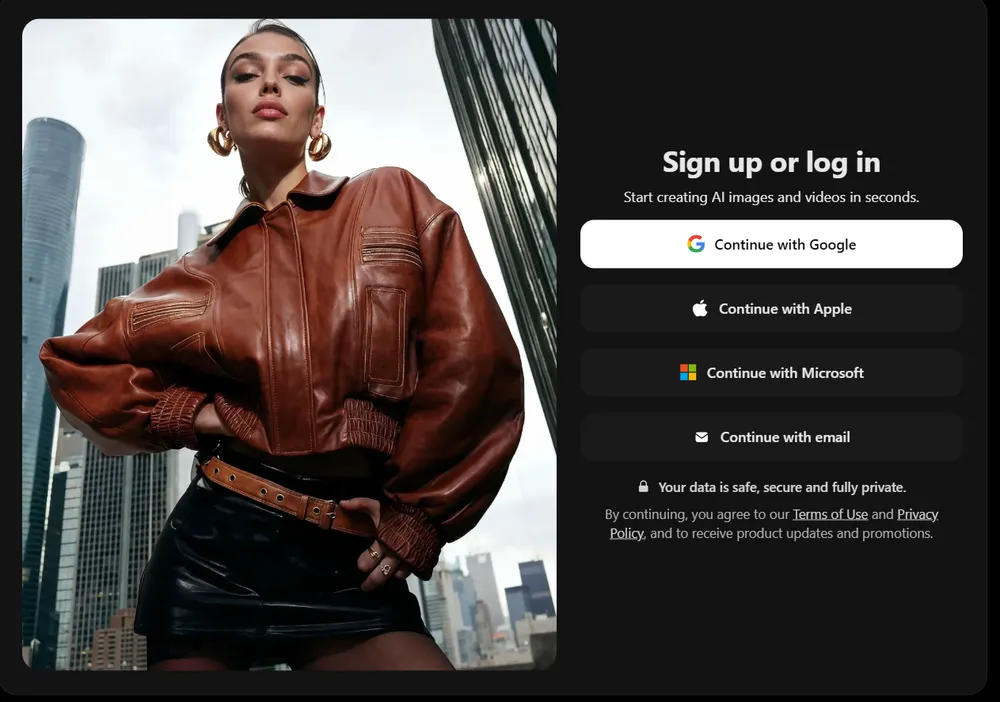
If you use the app, make sure you install the official app developed by HubX on Google Play or the App Store. The Google Play listing indicates that the Android app is called “DaVinci – AI Image Generator”, includes in-app purchases and belongs to HubX.
The second step is to choose the type of creation. Depending on your needs, you can start with an artistic image, a logo, a tattoo, an avatar, a product visual, a social media asset or a more realistic image. This matters because a good prompt is not the same for a minimalist logo, a realistic photo or a tattoo design.
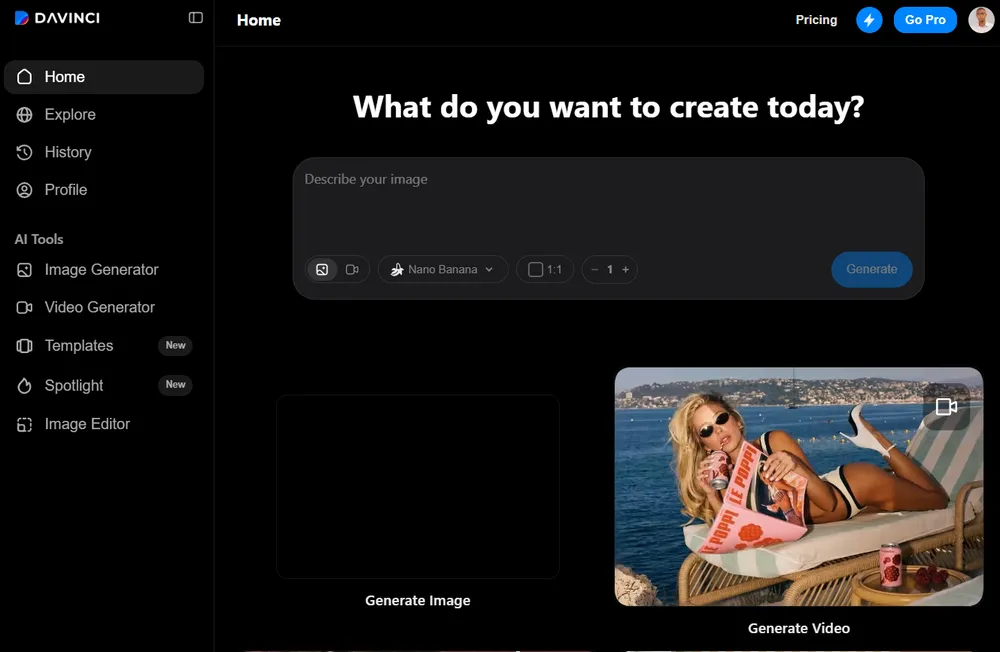
The third step is to write a precise prompt. Avoid requests that are too vague, such as “make me a beautiful image.” Prefer a clear instruction : main subject, style, mood, colors, format, level of realism, intended use and elements to avoid. For example : “Minimalist logo for a French artisanal coffee brand, premium style, dark brown and cream colors, simple coffee bean icon, white background, no complex text.”
The fourth step is to generate several variations. It is a mistake to judge DaVinci AI based on a single image. Like all AI image generators, the result can vary significantly from one attempt to another. To properly evaluate the tool, generate at least 3 to 5 variations per use case.
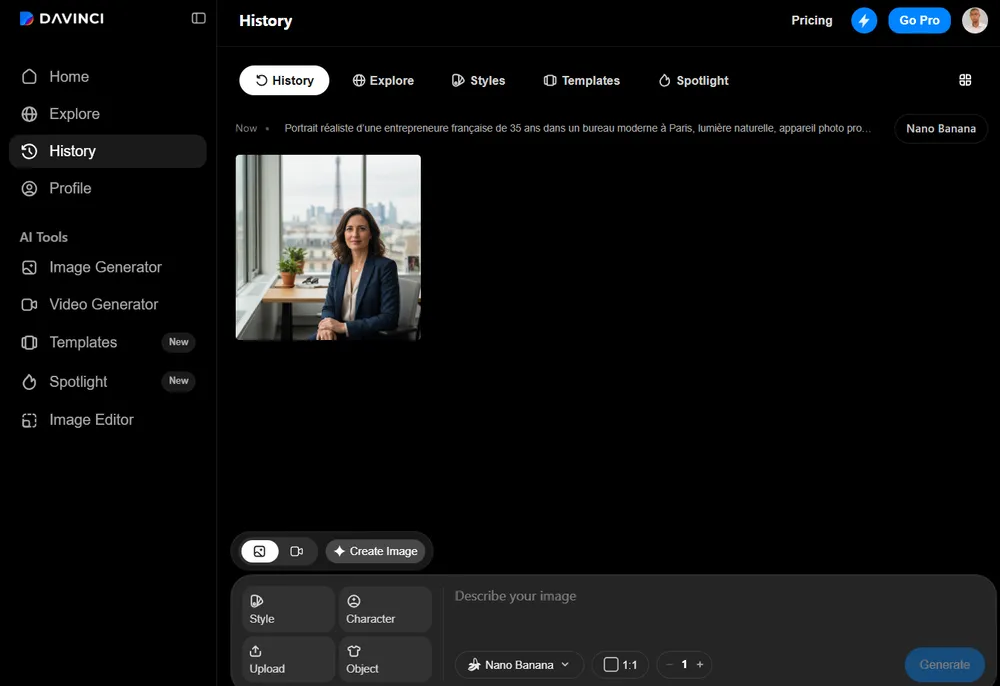
The fifth step is to refine the result. If the image is interesting but imperfect, adjust the prompt : add constraints, remove unnecessary details, change the style or ask for a simpler composition. DaVinci AI highlights editing, restyle, resizing, upscale, background replacement and object modification features, which makes it possible to go beyond a simple first generation.
The sixth step is to verify the final use. Before publishing an image, check the quality, details, possible errors, resolution, watermark, usage rights and consistency with your brand. For a logo, a paid advertising campaign or a client visual, this verification is essential.
Test Prompts to Use in DaVinci AI
The best test prompts are those that represent real use cases : logo, tattoo, portrait, advertising visual, e-commerce product and social media image. The goal is not only to produce a beautiful image, but to check whether DaVinci AI understands precise instructions and produces a usable result.
To test DaVinci AI seriously, you need to use concrete prompts. Here is a base Joseph can reuse in the article.
Prompt 1 — Realistic Portrait
“Realistic portrait of a 35-year-old French entrepreneur in a modern office in Paris, natural light, professional camera, editorial style, confident expression, slightly blurred background, very realistic rendering, no text.”
Test objective : check faces, skin, hands, lighting, realism and overall consistency.
Prompt 2 — Minimalist Logo
“Minimalist logo for an artisanal coffee brand called Café Luma, simple coffee bean and rising sun icon, premium style, dark brown and cream colors, white background, vector style, readable, no unnecessary details.”
Test objective : check whether DaVinci AI handles logos, text, simplicity, readability and brand consistency.
Prompt 3 — Tattoo
“Minimalist tattoo design representing a mountain, a moon and a river line, fineline style, black and white, suitable for the forearm, elegant composition, no excessive shading.”
Test objective : check whether the tool produces an idea that can be used by a tattoo artist or only a decorative illustration.
Prompt 4 — Advertising Visual
“Advertising image for a luxury perfume bottle placed on a black stone, studio lighting, subtle reflection, premium mood, dark background, commercial photography style, no text.”
Test objective : check objects, reflections, textures, staging and marketing rendering.
Prompt 5 — Social Media Visual
“Square image for Instagram showing a content creator using artificial intelligence to generate images, futuristic mood, blue and purple colors, modern style, empty space at the top to add a title.”
Test objective : check whether DaVinci AI can create a visual usable in an editorial calendar.
Prompt 6 — Product Image
“Realistic photo of a pair of wireless earbuds on a minimalist desk, soft light, bright background, premium e-commerce style, very high sharpness, no text.”
Test objective : compare DaVinci AI with Pixelcut for a product-related use case.
Prompt 7 — Image-to-Image
Import a simple image, then ask : “Transform this photo into a premium advertising visual, keep the main object, improve the lighting, add a clean studio background, realistic rendering.”
Test objective : check the tool’s ability to preserve an object or composition.
For each prompt, the article should add a score out of 10, a comment and a recommendation. Example : “Good for quick inspiration, but not yet enough for a final logo.”
FAQ
Is DaVinci AI free?
DaVinci AI offers free initial access with a limited amount of trial credits. No permanent free plan is currently displayed in the official pricing table. Paid plans start at $39.99/month with the Max plan when billed annually.
Before signing up, check the length of the trial period, when the first payment is charged, and the cancellation procedure — several Google Play reviews mention unexpected issues around this point.
How do DaVinci AI credits work?
Credits are the platform’s internal currency. Each generation consumes a certain number of credits, which varies depending on the model used and the type of output. A standard image generated with Flux uses fewer credits than a video created with Sora or Veo.
Credits reset at the beginning of each billing cycle. Downloading an already generated creation does not consume additional credits. Extra credits can also be purchased on demand. The Max plan includes 5,000 credits/month, Ultimate includes 15,000, and Creator includes 40,000.
Is DaVinci AI safe for privacy?
The official website states that user data is not used to train AI models and that creations remain private by default. However, the Google Play listing indicates that the application may share certain types of data with third parties, including in-app activity and device identifiers, and that data may not be encrypted according to the displayed safety labels.
For personal use or light creative work, the risk may be acceptable for many users. For professional use involving confidential visuals, product prototypes, or customer data, carefully review the privacy policy before uploading anything.
What is the difference between DaVinci AI and DaVinci Resolve?
There is no connection between the two products. DaVinci Resolve is Blackmagic Design’s professional video editing and color grading software — an industry-standard tool available in both free and Studio versions.
DaVinci AI (davinci.ai), on the other hand, is an AI media-generation platform developed by HubX and available through mobile apps and a web browser. The two products share a similar name but have no commercial or technological relationship.
What is the best free alternative to DaVinci AI?
Several alternatives offer more generous free access. Canva AI provides a free plan with limited access to image-generation tools. Adobe Firefly includes a monthly allowance of free generative credits. DALL·E / GPT Image can also be accessed through ChatGPT with usage limits depending on the account and plan.
For pure image generation without immediately paying for a subscription, Leonardo AI also provides a free tier with a daily token allowance. The best choice depends on your main use case: integrated design workflows with Canva, artistic image generation with Leonardo AI, or conversational image creation through ChatGPT.
Conclusion
DaVinci AI is a serious option for creators who want access to several leading models — Sora, Veo, Kling, Flux — within a single subscription, from either a mobile device or a web browser. The platform’s all-in-one promise is real, but the execution remains inconsistent.
The 2.9-star Android rating should not be ignored. It reflects genuine frustration around pricing and subscription management. At the same time, the 4.6/5 Trustpilot rating reflects real satisfaction among users who have found a workflow that suits them. Both realities can exist at the same time.
Our practical recommendation: test DaVinci AI with a specific use case before committing to an annual plan. If you need both AI video and image generation in one mobile-friendly platform, the Max plan at $39.99/month may make sense. If you mainly generate still images, compare it with Midjourney or Leonardo AI first. If commercial safeguards are a major priority, Adobe Firefly remains a strong alternative.
