

CritiquePlus Comparator Launches on WordPress.org to Simplify Product and Software Comparisons
CritiquePlus Comparator is now available directly from the official WordPress.org Plugin Directory. Developed by CritiquePlus, the plugin is aimed at publishers, bloggers, affiliates, agencies, and businesses that want to build product, software, or service comparison websites without having to develop the entire underlying infrastructure themselves.
At the time of our review, on September 4, 2026, WordPress.org officially lists CritiquePlus Comparator 0.28.61. The plugin requires WordPress 6.5 or later, PHP 8.1 or later, and is listed as tested up to WordPress 7.1. The directory currently shows fewer than ten active installations and no user reviews, which is understandable for such a recent launch but also means its reliability at scale should not yet be presented as proven.
Editorial transparency note: CritiquePlus Comparator is developed and published by CritiquePlus Technologies. This article therefore covers a product from our own ecosystem. It should not be interpreted as an independent third-party review.
What has actually changed
The biggest development is not simply the existence of CritiquePlus Comparator. A downloadable version was already available through the CritiquePlus platform.
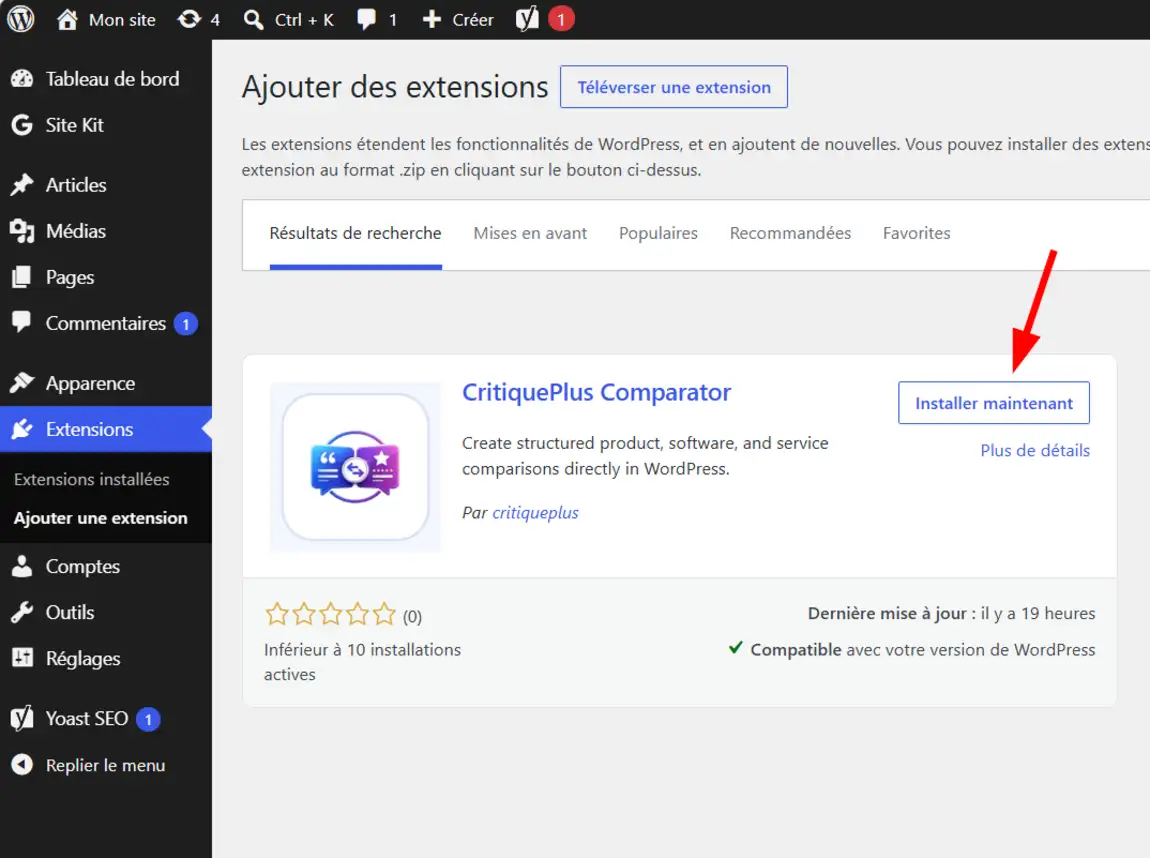
The concrete change is its arrival in the WordPress.org Plugin Directory. Users can now search for the plugin directly from their WordPress dashboard, click Install Now, and activate it without manually downloading a ZIP archive.
This presence also means that the plugin has been accepted through the WordPress.org plugin publishing process.
The official WordPress documentation explains that after submission, a plugin enters a review queue and may be approved when the team does not identify issues related to areas such as security, compatibility, compliance with directory guidelines, or overall presentation.
What is CritiquePlus Comparator used for?
Its positioning goes beyond being a simple comparison table generator.
The free version allows users to:
- create libraries of products and comparisons,
- define criteria,
- assign scores,
- list advantages,
- list disadvantages,
- add FAQs,
- and publish this information through reusable layouts.
It also supports imports from CSV, JSON, and XML files, as well as from selected URLs or APIs, with export and backup features included. Publishers already managing large catalogs can therefore reduce part of the manual data-entry workload.
Another important area is SEO. The WordPress.org documentation mentions the generation of Product, Review, ItemList, FAQPage, and BreadcrumbList structured data, as well as compatibility foundations for Yoast SEO, Rank Math, and All in One SEO.
That does not mean installing the plugin is enough to achieve higher rankings on Google. Structured data can help search engines better understand content, but it does not guarantee rankings, rich results, or additional traffic.
Why its arrival on WordPress.org matters
For CritiquePlus, this launch primarily marks a change in positioning: our media platform is no longer limited to publishing guides and comparisons. It is also beginning to develop its own tools for WordPress publishers.
That direction is consistent with the site’s long-standing coverage of software, web hosting, SEO, AI, and product comparisons. CritiquePlus has also explained its goal of turning comparison content into genuine decision-making tools rather than simple feature tables.
For users, however, one of the main advantages lies elsewhere: CritiquePlus Comparator Free works without a CritiquePlus account, without a license key, and without a paid subscription. WordPress.org also states that the package available through its directory does not contain hidden premium code.
This is an important distinction in a market where many free plugins primarily act as gateways to paid products while offering only a very limited Free edition.
A plugin also designed for affiliate marketing
Comparison websites often rely on commercial links and affiliate marketing programs. CritiquePlus Comparator therefore includes settings for affiliate links, link attributes, transparency disclosures, and optional destination verification.
The plugin can also store anonymous view and affiliate-click statistics locally.
From a privacy perspective, the chosen configuration is worth highlighting: these statistics are disabled by default. When an administrator enables them, WordPress.org states that the events are stored within the WordPress installation and that no analytics data is automatically sent to CritiquePlus.
The plugin also states that it does not store visitors’ IP addresses, raw user-agent strings, or visitor cookies in its analytics tables.
External requests mainly occur when an administrator initiates a remote import, enables link verification, or when a visitor voluntarily clicks an affiliate destination.
Free vs Pro: what is the difference?
The strategy is built around a standalone free core and a separately installed CritiquePlus Comparator Pro module.
The Free version covers products, criteria, comparisons, imports, exports, backups, structured data, affiliate features, and local statistics.
The Pro module adds features including:
- a Versus Mode for comparing two products head-to-head,
- custom calculators,
- premium templates,
- a setup assistant,
- and an AI assistant compatible with providers such as OpenAI, Anthropic, Gemini, and DeepSeek.
CritiquePlus states that actions generated by this assistant must first be previewed and then approved by a human before they are executed.
This separation is also clearly enforced on WordPress.org: the Pro module is not included in the package distributed through the official directory.
What CritiquePlus should not present as guaranteed
CritiquePlus Comparator is not a solution that allows users to build a successful comparison website “without effort.”
The plugin mainly reduces the technical workload. It does not replace product research, price verification, the selection of relevant comparison criteria, the writing of advantages and limitations, or the creation of a credible editorial verdict.
The free version also remains largely structured around information entered or imported by the publisher. Automation and AI are more closely associated with the Pro module.
Who can really benefit from CritiquePlus Comparator?
The most obvious audience includes content creators, specialist bloggers, and publishers who regularly publish comparisons of software, AI tools, web hosting providers, financial services, technology products, or professional solutions.
Affiliate websites may also find it useful thanks to its management of commercial links, configurable link attributes, and local statistics.
For web agencies and WordPress freelancers, the main advantage is the ability to build comparison structures for clients more quickly without recreating an entire product and criteria database for every new project.
SMEs can also use it when several offers, products, or services need to be presented in a structured way.
However, owners of large online stores looking exclusively for a native WooCommerce comparison solution should assess their requirements carefully. The official documentation positions CritiquePlus Comparator primarily as a platform for comparing products, software, and services rather than as a specialized WooCommerce extension.
How to install CritiquePlus Comparator from WordPress
The easiest method corresponds directly to the screenshots shown above:
- Log in to your WordPress dashboard, hover over Plugins, then click Add Plugin. The first screenshot shows this exact path in the administration menu.
- On the Add Plugins page, search for CritiquePlus Comparator. The official listing should appear with the plugin name and the author critiqueplus. Click Install Now.
- Wait for the download and installation to finish. The Install Now button will then be replaced by Activate. Click Activate.
- Once activation is complete, WordPress displays the Plugin activated message. A new Comparator menu appears in the administration sidebar.
- Open Comparator. The screenshots provided show access to the dashboard, comparisons, products, categories, criteria, imports/exports, affiliate links, statistics, appearance, integrations, and settings.
- Start by creating your products, your criteria, and then your first comparison before publishing it. The plugin can also be installed manually by downloading its ZIP file and using Plugins > Add Plugin > Upload Plugin, a method also documented on WordPress.org.
The official listing is available directly on WordPress.org — CritiquePlus Comparator.
What you need to know
CritiquePlus Comparator can now be distributed and installed directly through WordPress.org, making the installation process significantly easier. The free version already includes product, criteria, and comparison management, imports and exports, structured data, affiliate features, and optional local statistics.
Its arrival in the official directory is an important milestone, but it should not be interpreted as definitive proof of large-scale quality or reliability. With fewer than ten active installations at the time of publication, the next phase will be shaped by real-world usage: user feedback, compatibility across a wider range of WordPress environments, and the pace of future maintenance.
Also read on CritiquePlus
To explore the broader ecosystem, the CritiquePlus Comparisons page explains how to structure comparisons around user needs, pricing, limitations, and trade-offs. Explore CritiquePlus comparisons
Beginners can also read our guide explaining what a WordPress plugin is and how to install one. WordPress plugin guide
For monetized websites, CritiquePlus’s transparency and affiliate policy provides useful context for the affiliate-link features available in Comparator. Transparency, partnerships and affiliate marketing
Finally, news, guides, and tutorials dedicated to the CMS are available in the CritiquePlus WordPress section
