
Download ChatGPT on Android : APK, Official App, and Secure Installation
The official ChatGPT app for Android should primarily be downloaded from Google Play or the official ChatGPT page. It is published by OpenAI, free to download, and requires Android 7.0 or a more recent version with Google Play. Third-party APK files may help some users in specific cases, but they come with more risks. Before installing, always check the publisher, source, and permissions.
Are you looking to download ChatGPT APK for Android? Before installing a file found on a third-party website, it is important to make sure you are using the official application published by OpenAI. The popularity of ChatGPT has led to the appearance of many download pages, APK files, XAPK files, and applications that sometimes use the name or appearance of ChatGPT.
The safest method remains using Google Play or the official ChatGPT download page. OpenAI states that the official Android app can be found by searching for “openai chatgpt” on Google Play, in order to verify that it is indeed published by OpenAI.
In this guide, you will see where to download ChatGPT on Android, how to recognize the official application, when an APK file may be useful, what the Android requirements are, and how to avoid fake applications. The goal is not only to install ChatGPT quickly, but to do so without taking unnecessary risks for your phone, your data, or your Google account.
Where to Download ChatGPT on Android Officially
The recommended method is to download ChatGPT from Google Play or from the official ChatGPT download page, while checking that the application is indeed published by OpenAI.
To install ChatGPT on Android, the best option is to use the official app listing on Google Play. The listing indicates that the application is published by OpenAI, that it is free to download, and that it offers in-app purchases. It also displays more than 1 billion downloads, a 4.7-star rating, and tens of millions of reviews at the time of verification.
OpenAI also offers an official “Download ChatGPT” page that redirects users to the mobile and desktop versions of the application. This page presents mobile use around three simple needs: chatting on the go, using voice conversations, and asking questions from photos.
The rule to remember is simple: before installing, always check the publisher’s name. On Google Play, the publisher must be OpenAI. This is the most direct way to avoid copies, misleading apps, or files promising a “free Pro version.”
Quick Overview of the ChatGPT Android App
| Element | Information to Check |
|---|---|
| App name | ChatGPT |
| Publisher | OpenAI |
| Platform | Android |
| Recommended source | Google Play or official ChatGPT page |
| Price | Free to download |
| In-app purchases | Possible depending on offers and subscriptions |
| Official compatibility | Android 7.0 or later with Google Play |
| Internet connection | Required to use the service |
| Third-party APK | Avoid unless the source is verified and there is a specific need |
ChatGPT APK : Do You Really Need to Download an APK File?
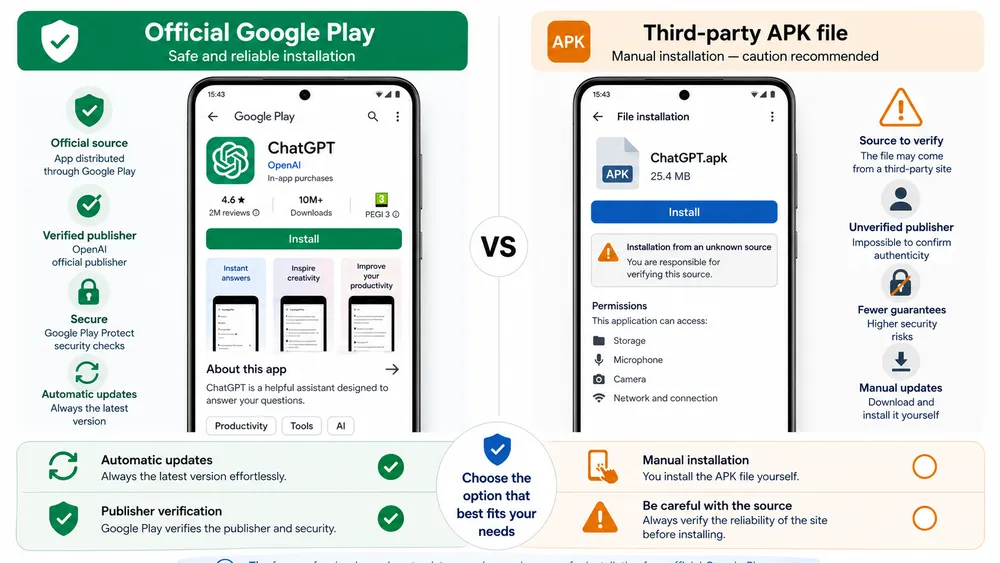
An APK file allows you to manually install an Android application, but for ChatGPT, downloading through Google Play remains preferable in order to avoid modified files, fake applications, and update issues.
An APK is an Android installation file. It may be useful in some cases: a device without direct access to the Play Store, an availability issue, a specific version being required, or a particular technical environment. But for an application as popular as ChatGPT, this method carries more risks than a standard installation from Google Play.
The main problem is not the APK format itself. The risk mainly comes from the source of the file. An APK downloaded from an unknown website may be outdated, modified, misidentified, or bundled with a third-party installer. Even when a website displays a security score, users should remain cautious: they do not always benefit from the same automatic update and verification guarantees as on Google Play.
Softonic, for example, highlights an XAPK download with a security score, a VirusTotal analysis, and SHA fingerprints. This shows what Google indirectly expects for this search intent: evidence, a version, an analysis date, and technical information. But for a standard user, the official source remains simpler and safer.
Google Play or Third-Party APK: Which Should You Choose?
| Criterion | Official Google Play | Third-Party APK / XAPK |
|---|---|---|
| Source | OpenAI via Google Play | External download website |
| Updates | Automatic | Often manual |
| Publisher verification | Simple | Must be checked manually |
| Risk of modified file | Lower | Higher |
| Installation | Simple | May require allowing unknown sources |
| Older versions | Not highlighted | Often available |
| Recommendation | Preferred | Reserved for specific cases |
In practice, if you have access to Google Play, install ChatGPT from Google Play. If you absolutely need to use an APK, take the time to check the publisher name, package name, version, update date, permissions, and the reputation of the website.
Android Compatibility and Requirements
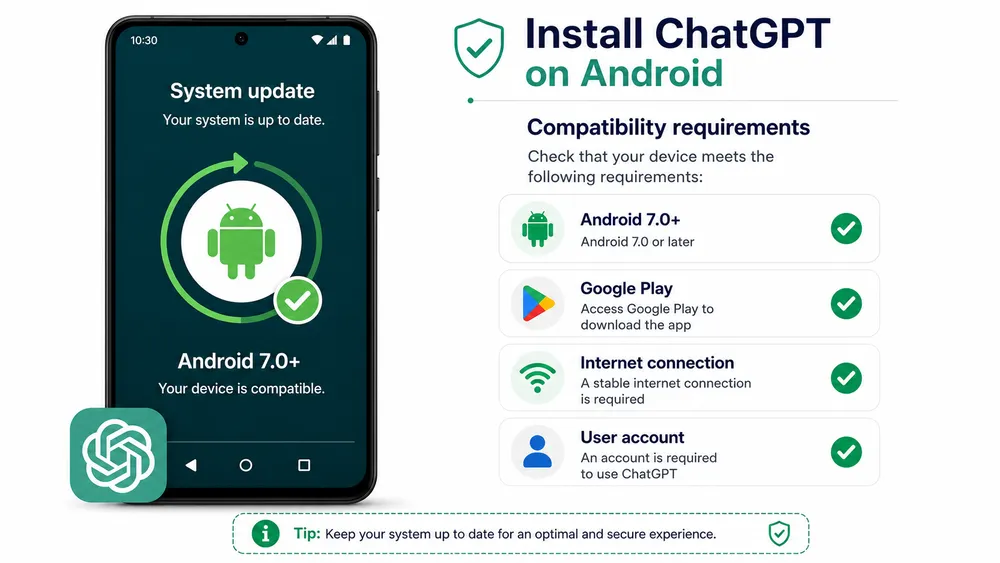
OpenAI states that the ChatGPT app for Android works on any Android device with Google Play running Android 7.0 or a more recent version.
The official minimum requirements are clear: you need an Android device with Google Play running Android 7.0 or later. OpenAI confirms this in its help documentation dedicated to the minimum requirements for the ChatGPT Android app.
This means that an older phone may still be compatible, as long as it has Google Play and a sufficiently recent Android version. However, some devices without Google services, modified tablets, or alternative Android environments may encounter limitations.
You should also keep in mind one important point: ChatGPT is not an offline application. Even if the app is installed on your smartphone, it must communicate with OpenAI’s services to generate answers, access your history, use certain voice features, or process images.
Recommended Requirements
| Element | Recommendation |
|---|---|
| Android system | Android 7.0 or later |
| Google services | Google Play required according to OpenAI |
| Internet connection | Wi-Fi or mobile data |
| Account | OpenAI account or compatible sign-in method |
| Storage | Variable depending on version and device |
| Update | Updated Google Play recommended |
The exact file size may change depending on the app version, processor type, device, and installation method. It is therefore better to avoid making a fixed promise such as “50 MB minimum” unless it has been verified at the time of publication.
How to Install ChatGPT on Android Step by Step
Open Google Play, search for “openai chatgpt,” check that the publisher is OpenAI, tap Install, then sign in to your account.
Here is the simplest method to install ChatGPT on Android:
- Open the Google Play Store app.
- Search for “openai chatgpt.”
- Check that the application is indeed published by OpenAI.
- Tap Install.
- Open the ChatGPT app.
- Sign in with your account.
- Check that your history and settings match your usual account.
OpenAI explicitly recommends searching for “openai chatgpt” in Google Play to make sure you download the official application published by OpenAI.
After installation, you can check the app version from the sidebar, then the profile icon and the “About” section, depending on the language of your interface. OpenAI documents this method in the ChatGPT Android FAQ.
ChatGPT Features on Android
The ChatGPT Android app allows you to chat with AI, synchronize your history, use voice mode, ask questions from photos, and get help with writing, learning, or organizing your ideas.
The ChatGPT Android app brings the ChatGPT experience into a mobile interface. It notably highlights instant answers, voice mode, photo upload, creative inspiration, learning support, professional advice, and image generation among the promoted use cases.
In practical terms, the app can be used to write an email, rewrite a message, prepare an itinerary, summarize a concept, get content ideas, practice a foreign language, or analyze a photo. It is also useful for accessing your history across several devices, since the Google Play listing indicates that the app synchronizes history between devices.
Main Uses of ChatGPT on Android
| Feature | Example Use |
|---|---|
| Text conversation | Ask a question, request an explanation, generate an idea |
| Voice mode | Dictate a request or chat while on the go |
| Photo upload | Ask for information based on an image |
| Synchronized history | Find your conversations on mobile and desktop |
| Writing | Emails, messages, summaries, outlines, rewrites |
| Learning | Understand a lesson, revise, learn a language |
| Productivity | Organize a task, prepare a meeting, structure a project |
| Image creation | Generate or transform images depending on available options |
Business Insider reported, based on Appfigures data, that the ChatGPT app had been downloaded around 410.8 million times worldwide in 2025 and had ranked as the most downloaded app on Google Play and the App Store for seven consecutive months, from March to September 2025.
This massive demand naturally attracts APK websites, but also misleading applications. That is why it is important to systematically check the source before installation.
Is ChatGPT Android Free?
Yes, the official ChatGPT app is free to download, but some advanced features, usage limits, or offers may depend on a subscription or in-app purchases.
The official ChatGPT app is free to download. However, the Google Play listing indicates that it includes in-app purchases. You should therefore avoid overly absolute wording such as “free unlimited ChatGPT APK” or “free ChatGPT Pro.”
So the app is free to install, but some features may depend on the account, usage limits, or a subscription. This makes it possible to answer the “free” search intent without creating a misleading promise.
You should also be careful with applications that use ChatGPT’s reputation to sell excessive or unclear subscriptions. Sophos has documented so-called “fleeceware” applications that exploit interest in ChatGPT by pushing users toward expensive subscriptions, sometimes for features available for free elsewhere.
Free Version or Subscription : What to Remember
| Question | Answer |
|---|---|
| Is the app free to download? | Yes |
| Do you have to pay to open the app? | No, not for the official installation |
| Are there paid offers? | Yes, depending on available plans and options |
| Can limits change? | Yes, depending on OpenAI’s policies |
| Are “free Pro” APKs reliable? | No, they should be avoided |
Security : How to Avoid Fake ChatGPT APK Apps
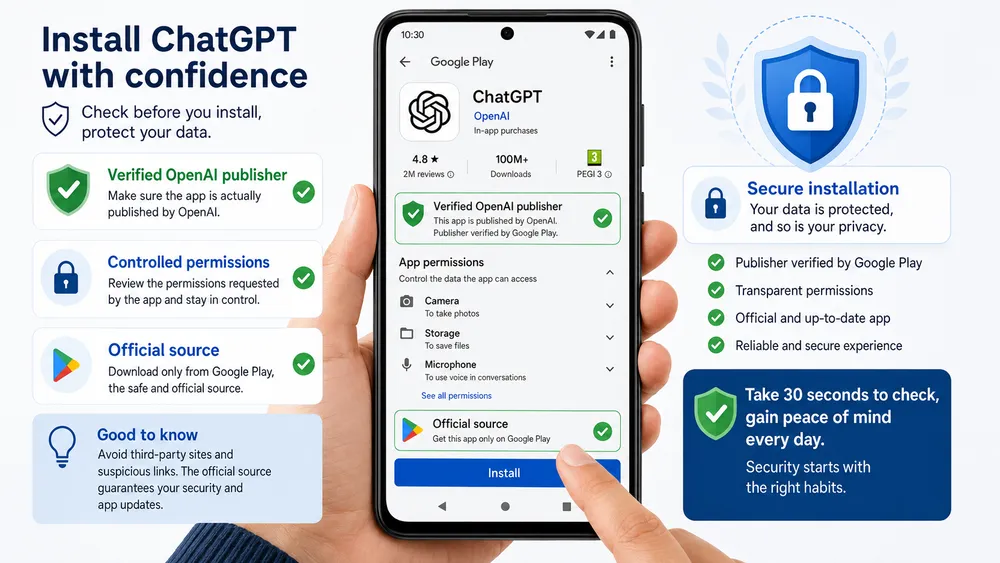
To avoid fake ChatGPT APKs, always check the OpenAI publisher, the download source, requested permissions, reviews, version, and avoid links shared on Telegram, forums, or unknown websites.
OpenAI asks users to make sure that the downloaded application is indeed published by OpenAI in order to obtain the official and secure version. Sophos, for its part, has already warned about fake apps related to ChatGPT found in app stores, using the AI trend to push users into expensive subscriptions.
Checklist Before Installing ChatGPT APK
| Check | Why It Matters |
|---|---|
| OpenAI publisher | Confirms that it is the official application |
| Download source | Helps avoid unknown websites or modified files |
| Displayed version | Helps identify an outdated file |
| Requested permissions | Detects an overly intrusive app |
| User reviews | Sometimes reveal recurring issues |
| “Free Pro” promises | Often used by misleading apps |
| Recent update | Reduces the risk of an outdated app |
| Package name | Allows technical consistency to be checked |
In particular, avoid APK files shared through messaging apps, forums, YouTube comments, or shortened links. An application that promises “free ChatGPT Plus,” “unlocked ChatGPT Pro,” or “unlimited GPT without an account” should be considered suspicious.
Users should also check the permissions requested. An AI chat application may need microphone access for voice or photo access if you use image upload. However, an excessive or inconsistent permission request should be a warning sign.
What Should You Do If ChatGPT Does Not Appear on Google Play?
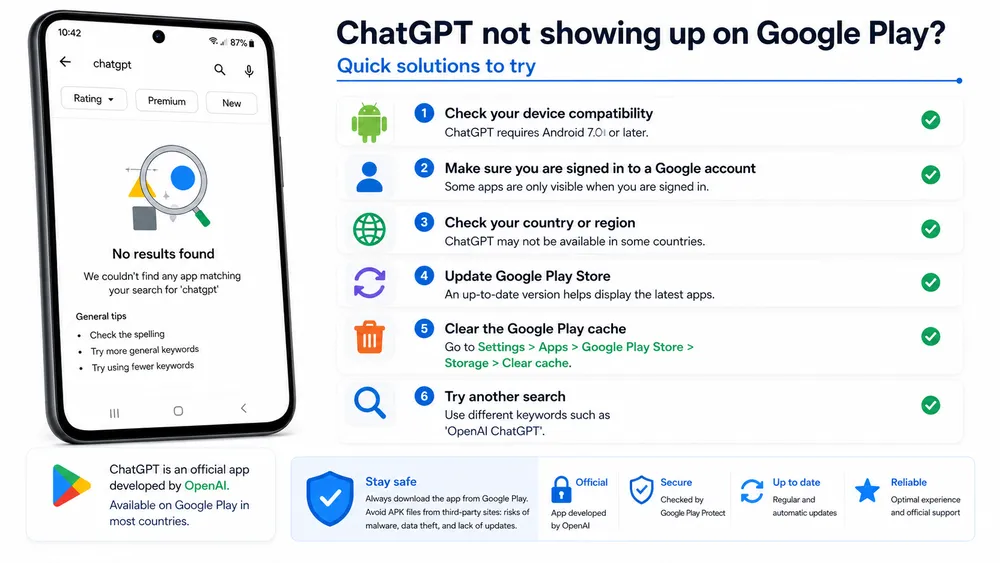
If ChatGPT does not appear on Google Play, check the Android version, Google services, availability in your country, the Google account used, and the status of the Play Store.
It may happen that ChatGPT does not appear immediately in Google Play or that the installation button is not available. This problem may be caused by several factors: incompatible device, Android version too old, absence of Google Play, regional restriction, or a temporary account issue.
OpenAI indicates that the app is available in many countries and refers users to the supported countries article to check availability. The Android FAQ also specifies that the app requires an Android device with Google Play running Android 7.0 or later.
Common Problems and Solutions
| Problem | Recommended Solution |
|---|---|
| The app cannot be found | Search for “openai chatgpt” |
| The Install button does not appear | Check Android compatibility |
| The device is not compatible | Update Android if possible |
| Google Play is not available | Check the device’s Google services |
| Unable to sign in | Update the browser and Google services |
| App already installed but buggy | Uninstall and reinstall from Google Play |
| Unknown version | Check the version in “About” |
If you use an Android device without Google Play, an APK may seem tempting. But in that case, you must be even stricter about the source, version, and permissions. For daily use, the most reliable option remains a device compatible with Google services and official installation.
APK, XAPK, and Older Versions : What You Need to Know
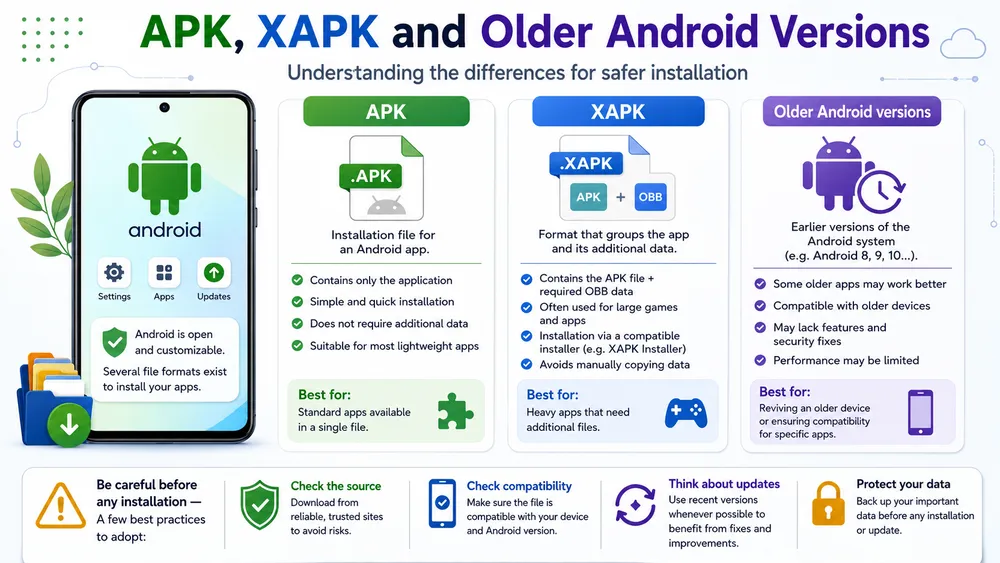
Some websites offer APKs, XAPKs, or older versions of ChatGPT, but these files should be used with caution, especially if they require an external installer.
Websites specialized in Android application downloads often offer several formats. APK is the best-known format, while XAPK may include additional files required for installation. This may explain why some websites recommend a dedicated installer.
Uptodown, for example, highlights older versions of ChatGPT and XAPK files. Its listing also states that, to work properly, the application must first be installed from Google Play, then can be updated with APK or XAPK files.
When Might an Older Version Be Useful to a User ?
| Situation | Caution Required |
|---|---|
| Bug in the latest version | Check whether an official update fixes the issue |
| Older device | Confirm actual compatibility |
| Temporary absence of the Play Store | Do not install from an unknown source |
| Specific professional need | Test on a non-critical device |
| XAPK file | Understand the installer being used |
Conclusion
Downloading ChatGPT on Android is simple, but the search query “ChatGPT APK” requires caution. The best method is to use Google Play or the official ChatGPT download page, then verify that the application is indeed published by OpenAI.
An APK file may be useful in specific cases, but it should not be presented as the normal installation method. For a standard user, Google Play offers simpler installation, automatic updates, and better publisher verification.
Before installing ChatGPT on Android, remember three habits: search for “openai chatgpt,” check that the publisher is OpenAI, and avoid promises that seem too good to be true, such as “free ChatGPT Pro” or “unlimited APK.” By applying these rules, you can enjoy the official application while reducing the risks associated with fake versions.
FAQ
Is ChatGPT APK official?
An APK file may contain the ChatGPT application, but the recommended official source remains Google Play or the official ChatGPT download page. Before installing, check that the application is indeed published by OpenAI.
Can ChatGPT be used offline on Android?
No. ChatGPT must connect to OpenAI’s services to respond to requests, synchronize history, and use its main features. The Android app should therefore not be presented as an offline tool.
Is ChatGPT Android free?
Yes, the official ChatGPT app is free to download. However, some advanced features, usage limits, or offers may depend on a subscription or in-app purchases.
Why does ChatGPT not appear on Google Play?
This may be due to an incompatible device, an Android version that is too old, a regional issue, a Google account issue, or an outdated Play Store. OpenAI indicates that the app requires Android 7.0 or later with Google Play.
How do I know if I am installing the real ChatGPT app?
Check that the publisher is OpenAI, prioritize Google Play or the official ChatGPT page, read reviews, look at permissions, and avoid files shared by unknown sources.